
1 / 3
be quiet! Pure Base 500 airflow mod for front cover (.STP)
Zamów wydruk tego modelu
Obliczymy ostateczną cenę na podstawie wybranego pliku. Sprawdzisz ją i zaakceptujesz przed płatnością.
Zapisane na tym urządzeniu.

be quiet! Pure Base 500 airflow mod for front cover.
- Ocena
- 0 / 5
- Polubienia
- 5
- Pobrania
- 48
- Wydruki
- 1
- Wyświetlenia
- 1641
- Oceny
- 0
Aktualizacja u źródła:
Informacje o modelu
- Źródło
- Printables
- Kategoria
- Computers
- Licencja
- Creative Commons — Attribution — Noncommercial — Share Alike
SzczegółyPliki (9)Wydruki i komentarze (Wydruki: 1) (Komentarze: 1)Remiksy (0)Kolekcje (10)Powiązane
Adding two 120mm holes to the front panel of be quiet! Pure Base 500 (not dx\fx) PC case.
Same thing is on Thingiverse.
Additional parts needed:

- Metal mesh cover 120x120 mm for pc cases
- (OPTIONAL) Mesh cover 140x140 mm with small cell size as dust filter with 4 pc fan screws.
- TOOL: 120mm hole saw (bimetallic bit for metal)
- TOOL: Shank for bimetallic bits (remove the spring)
- TOOL: screwdriver or drill with low speed
- TOOL: drill bit for wood with diameter less than shank drill has.
- GLUE: Viscous glue in color of your case (black or white). I use T-7000
- GLUE: Cyanoacrylate glue
- CONSUMABLE: few short wooden planks that you can stack to drill on and that will fit inside cover from the internal side. Those wooden planks must be narrower than internal noise absorbing sticker.
Instructions:
- The nozzle will scratch metal. be warned.
- Take plastic in color of metal mesh, it is preferred.
- See this picture for reference in slicing:
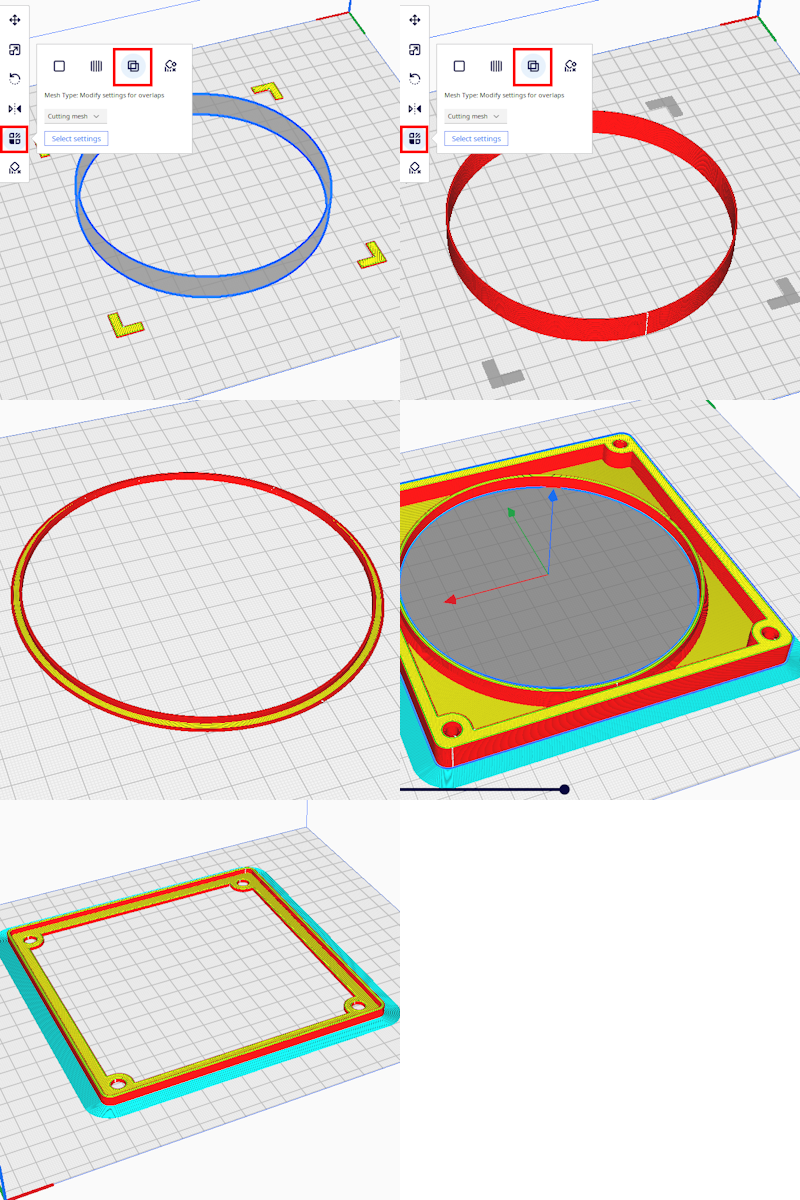
- Imprinting tube to metal mesh cover.
- Take
IMPRINTABLE_TUBE_WITH_ALIGN_CORNERSfile into slicer, select all models (CTRL + A in Cura) and align it in slicer as you want. - Remove the central tube (so only corners left), using deleting model or setting model to a cutting mesh type
- Slice it
- Build plate adhesion type: None
- Quality: draft
- Save as
corners.gcodefile - Cancel deletion\cutting mesh type (CTRL + Z in Cura)
- Remove corners same method, slice it and save as
tube.gcodefile - Print
cornersfile. Don't let the heatbed to cool down. - Place metal 120mm cover to fit corners
- Print
tubejust over metal mesh (black plastic here used)
- Wait heatbed to cool down
- Remove the mesh with imprinted tube
- Cut all mesh extends the tube
- Result is like this (here I used white plastic for demonstration purpose):

- Take
- Print
EXTERNAL_COVERwith the finest quality you can- Top/Bottom pattern: Concentric
- Z seam alignment: Random
- Build plate adhesion type: None
- Layer height: 0.1mm - 0.15mm (no need to make it thinner)
- Print (optionally)
INTERNAL_MESH_MOUNTandINTERNAL_MESH_COVERwith standard quality- Build plate adhesion type: Brim
- Repeat for number of holes you want
- Take off front cover
- Cover it with masking tape
- Mark centers of holes where you want
- Put it front-up on a wooden pieces you will damage with drill. Those wooden pieces should be narrower than internal sound noise absorbing sticker

- Drill hole in center with drill for wood. It must be less diameter than your shank's center guiding drill.
- Drill the big hole using 120mm bit
- Insert in
EXTERNAL_COVER - Insert in tube imprinted with mesh
- Disassemble, assemble back gluing it.
- Glue
EXTERNAL_COVERwith cyanoacrylate glue to front panel - Glue
tubeto hole walls using viscous glue.
- Glue
- (OPTIONAL) If installing small mesh filter
- glue
INTERNAL_MESH_MOUNTto tube with cyanoacrylate glue. 4 spots of glue will be enough.
- place 140mm mesh to
INTERNAL_MESH_MOUNT, cover it withINTERNAL_MESH_COVERand screw this sandwitch using pc fan screws.
- glue
- Result:

---
Inspired with u/Geri00's mod.
This case reddit page here.