
Running shoe keychain (Nike)
Obliczymy ostateczną cenę na podstawie wybranego pliku. Sprawdzisz ją i zaakceptujesz przed płatnością.
Zapisane na tym urządzeniu.

A keychain of a Nike running shoe that you can customize
- Ocena
- 4,667 / 5
- Polubienia
- 84
- Pobrania
- 821
- Wydruki
- 5
- Wyświetlenia
- 2047
- Oceny
- 3
Aktualizacja u źródła:
Informacje o modelu
- Źródło
- Printables
- Kategoria
- Outdoor Sports
- Licencja
- Creative Commons — Attribution — Noncommercial — Share Alike
A simple keychain of a running shoe. Modeled using a picture of the Nike Air Zoom Pegasus
Here is a similar model of a Saucony and Adidas running shoe that I made.
Slicer instructions:
The STL has 5 different parts (bodies). You can customize the slicing of each part, but I would recommend changing the one I used like this:
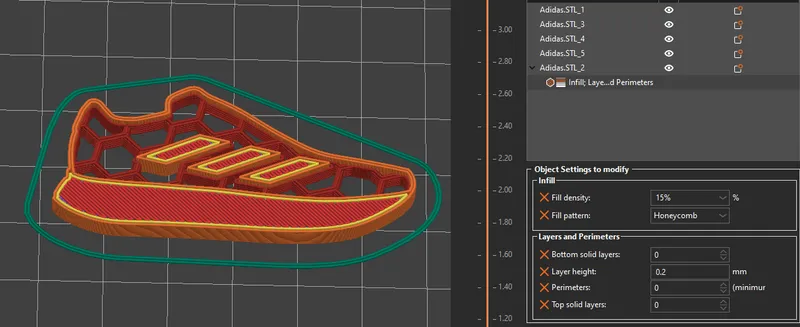
PrusaSlicer:
-Open the .3MF as a model.
-Now right click the correct part and click ‘Infill’ and ‘Layers and Perimeters’ at the bottom of the menu.
-You can now edit the object settings as seen in the bottom right of the picture below. Change the fill pattern and density to your own liking.
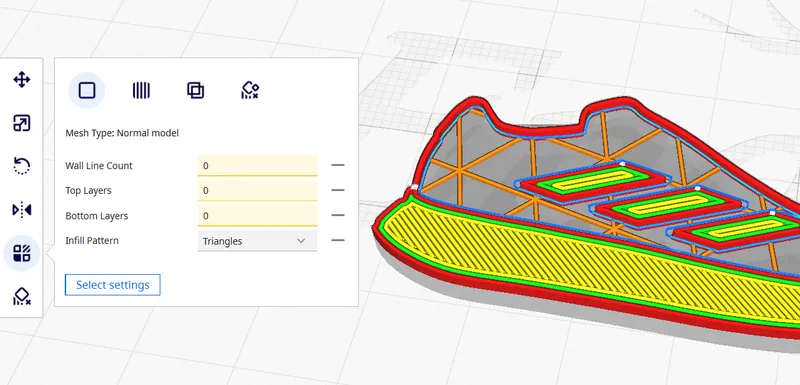
Cura:
-Open the .3MF as a model.
-Click the area of the shoe that needs to be changed and select ‘Per Model Settings’ in the menu on the left.
-Click ‘Select settings’ and in the new window, select (at least) the four settings you see in the picture below. Change them all to 0 and select your favorite infill pattern.
Enjoy!