
Sprite CR-Touch right mount + shell (28mm Y offset)
Obliczymy ostateczną cenę na podstawie wybranego pliku. Sprawdzisz ją i zaakceptujesz przed płatnością.
Zapisane na tym urządzeniu.

Mount + shell for the CR-Touch on a Creality Sprite extruder, with a 28 mm y-offset
- Ocena
- 0 / 5
- Polubienia
- 1
- Pobrania
- 27
- Wydruki
- 0
- Wyświetlenia
- 252
- Oceny
- 0
Aktualizacja u źródła:
Informacje o modelu
- Źródło
- Printables
- Kategoria
- Creality Parts & Upgrades
- Licencja
- Creative Commons — Attribution — Share Alike
This mount replaces the existing CR-touch shell to mount the probe as close as possible to the nozzle (and saves a few grams).
Best printed in PETG or other filaments with little warping on temperature change
The probe doesn't collide with https://www.printables.com/model/356355-5015-parts-fan-mount-for-sprite-extruder-reindeer- and https://www.printables.com/model/404984-sprite-pro-cullbuck-mod, but you will need to cut a bit of the stepper mount
CR-touch disassembly
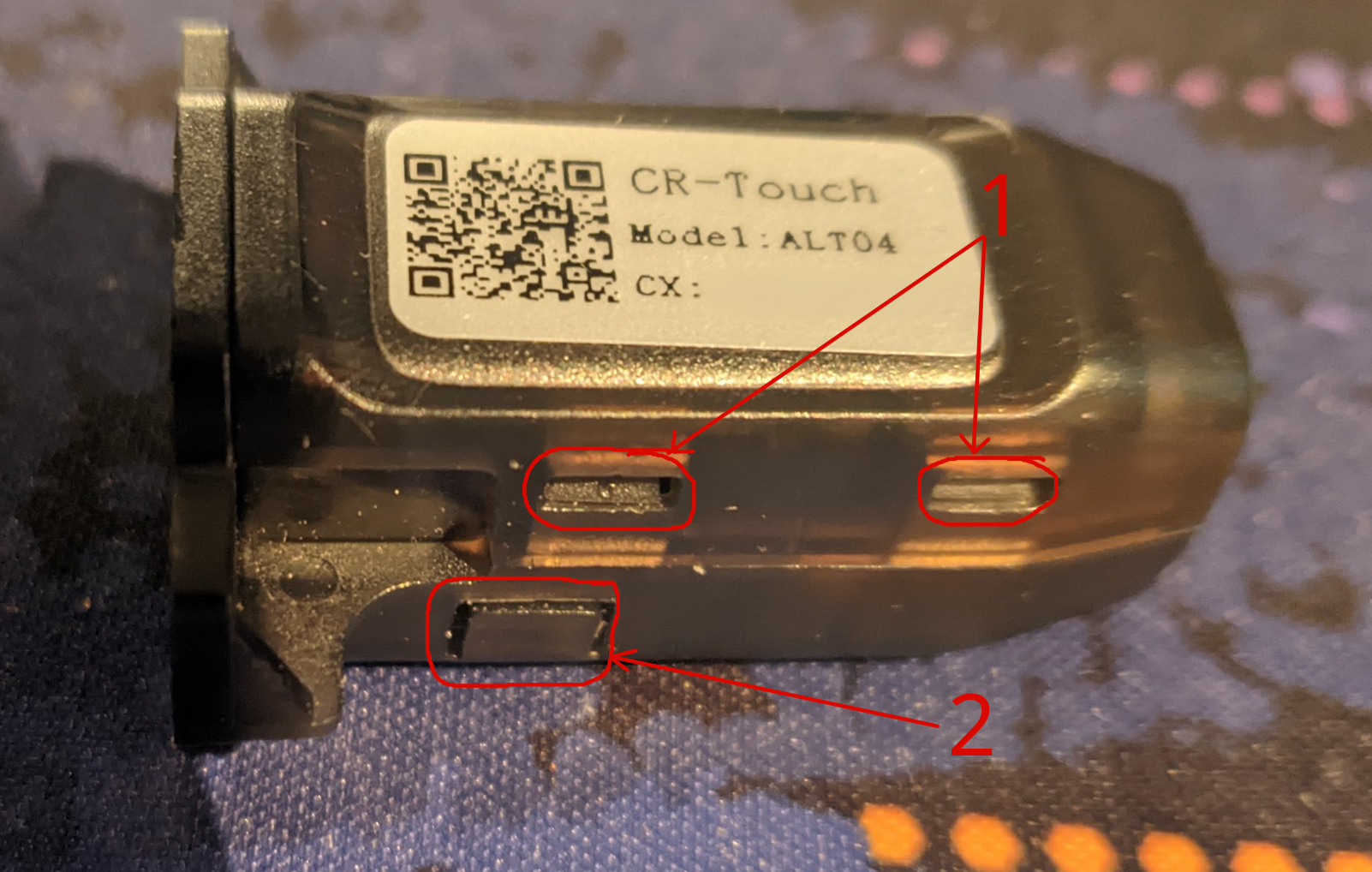
- Print the mount now, you won't be able to print anything without the CR-touch on the printer ;)
- Pry open the case while pushing on the clips (marked 1 on the photo) using a flat screwdriver
- The PCB is held by:
- 4 pegs on the PCB with some glue. I used a soldering iron on low heat (220°C) to soften the pegs and glue
- Two clips marked 2 on the photo, that needs to be pried with a flat screwdriver or a blade.
- Once disassembled, install it on the new mount by:
- sliding the PCB in the rails and lowering the small flexible clip.
- Once slided, raise the flexible clip to lock the PCB
- Push the solenoid in its slot
- Install the new mount on the extruder. You may need to remove one of the 4 screws holding the sprite extruder to make room for the cr-touch connector
Marlin config
Execute the following Gcode:
M851 X28 Y0 ; set probe offset
M500 ; save config
Klipper config
Merge your existing config with the values below:
# New BLTouch position
[bltouch]
x_offset: 28
y_offset: 0Places the probe at the center of the bed:
[safe_z_home]
home_xy_position: 87, 115
Bed mesh geometry
With the BLTouch at x offset 28, the bed cannot be probed at x < 23
[bed_mesh]
mesh_min: 23, 5
mesh_max: 225, 225
probe_count: 6
Inspirations:
- https://www.printables.com/model/733039-creality-ender-sprite-extruder-cr-touch-mount-zero gave me the idea to design a custom shell
- https://www.printables.com/model/579975-ender-3-s1-sprite-right-bltouch-mount-with-calibra my previous mount