
Z-Axis Stepper Motor Mount with integrated Axial Thrust bearing
Obliczymy ostateczną cenę na podstawie wybranego pliku. Sprawdzisz ją i zaakceptujesz przed płatnością.
Zapisane na tym urządzeniu.

The Axial thrust bearing combined with a rigid lead-screw compression coupler completely eliminates Z-axis banding.
- Ocena
- 4,625 / 5
- Polubienia
- 240
- Pobrania
- 1829
- Wydruki
- 10
- Wyświetlenia
- 9374
- Oceny
- 8
Aktualizacja u źródła:
Informacje o modelu
- Źródło
- Printables
- Kategoria
- Other Printer Parts & Upgrades
- Licencja
- Creative Commons — Attribution
Z-Axis Stepper Motor Mount with integrated Axial Thrust bearing. The Axial thrust bearing combined with a rigid lead-screw compression coupler completely eliminates Z-axis banding caused by the stepper motor “wobbling” under the weight of the X-gantry.
Do not use Flexible Couplers, the whole point is to remove vertical wobble, Flexible couplers make the print quality worse when used with Thrust bearings.
The required bearing is an AT Thrust Bearing 9X20X7mm (F9-20M) - I recommend you apply a small amount of grease to the bearings on both sides before installation.
eg AT Thrust Bearing 9x20x7mm (F9-20M)
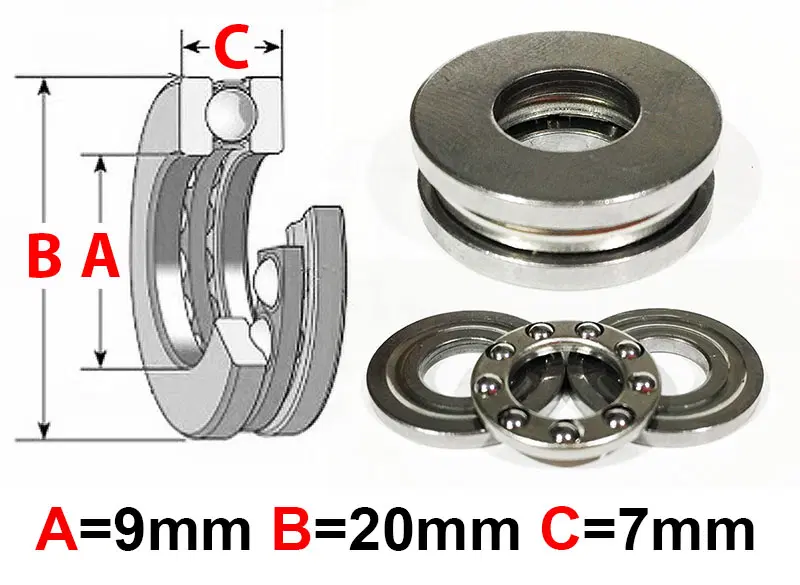
This part is designed for the Anycubic Mega Zero however, it works on the Ender 3 using T-nuts to attach the stepper mounts to the printer frame.
Please print this in ABS pr PETG so it doesnt warp from the heat of your bed and the stepper motor itself.
As a result of my testing, I learned a couple of things that might help others.
- Lead screws are never straight (not even brand-new ones)
- Fixing lead screws at the top of the printer doesn’t help if the issue is caused by your stepper motor, and may lead to binding, but does make Z-Banding worse in this case
- Alignment of the lead screws and X-Gantry is critical to get right
- Ensure the Compression coupler is sitting firmly on top of the thrust bearing.
- Adding a 1/4" bearing (6.3 mm) inside the top section of the Coupler (between the stepper shaft and the bottom of the lead screw) will stop the uneven shaft surfaces from rubbing against each other and adding Z artefacts to your print.
Problem Solved!
https://youtube.com/shorts/OvVs0wmuFR0?feature=share
Update 9/22: Version 2 of the motor mount has been uploaded - it doesnt need the thrust bearing spacer.
Update 4/23: If you still have z-banding after installing my mount and following my instructions, this means that your stepper motor moving in the Z-Axis was likely not the problem (or not the largest part of the problem).
If this is the case, I recommend installing flexible mounts for your lead-screw-nuts (eg Ender 3 Flexible Lead Screw Mount and Top Bearing Support to solve Z-Banding) and then rigid bearing-mounts for the top of your lead screw. This will allow your lead screw to wobble without moving your X-gantry around and impacting your print quality.
CAD files now included.