
Children's Learning Toy - Magnetic Tower
Obliczymy ostateczną cenę na podstawie wybranego pliku. Sprawdzisz ją i zaakceptujesz przed płatnością.
Zapisane na tym urządzeniu.
Informacje o modelu
- Źródło
- Printables
- Kategoria
- Other 3D Objects for Learning
- Licencja
- Creative Commons — Attribution — Noncommercial — Share Alike
This model is one from my extensive Children's Toys Collection.
For another model, I had gotten a set of magnets and had some left over. Perfect for another project: the Magnetic Tower. It's an item that can be used to explain the behavior of magnets to children in a playful way.
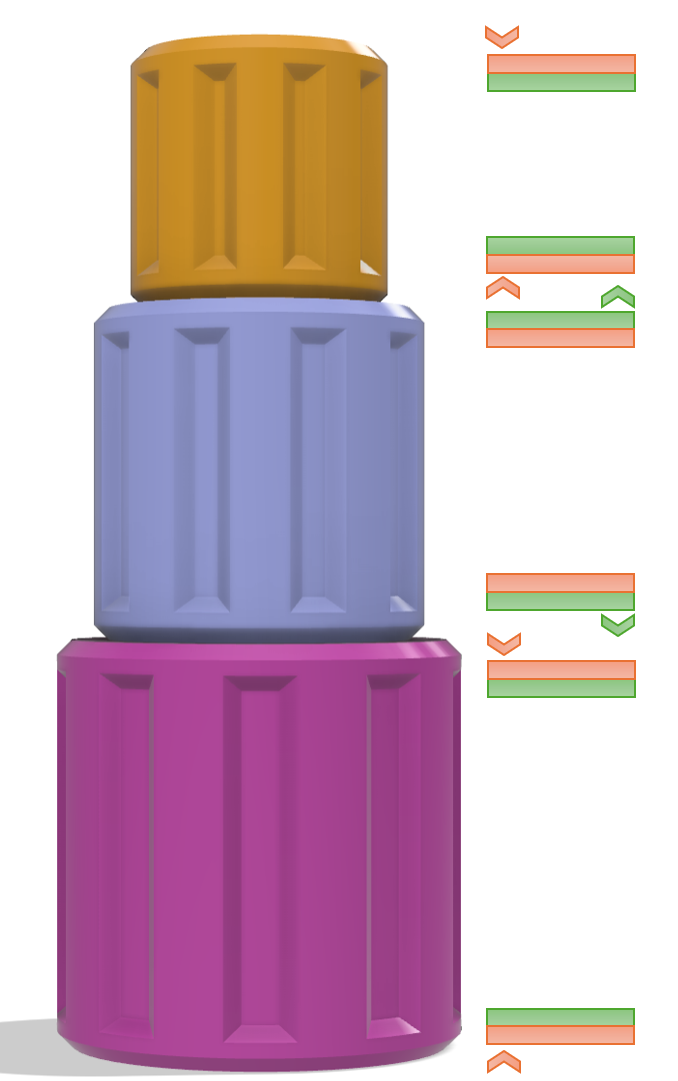
The tower consists of three parts that are stacked on top of each other. The largest part is at the bottom, the smallest part is at the top, and the medium part is in between. The magnets are arranged during printing so that stacking the three parts into a tower is only possible in this order.
Here's what you need for that:
- You need 6 magnets with a diameter of 10mm and a height of 5mm.
I can recommend this set of 25 magnets. (If you find equivalent magnets in a smaller set, even better.) These are really extremely strong neodymium magnets. Classified as N52, currently the strongest commercially available type.
I have designed the magnet slots with a tolerance. Two 3mm magnets or three 2mm magnets can be used instead of one 5mm magnet.
- Additionally, you will need some super glue to secure the magnets in place during the printing process.
!!! Please read the following printing information carefully before you start. !!!
Printing information
All STL files are correctly aligned.
Layer height: 0.20
Perimeter: 3
Infill: 10%
Support: none
To insert the magnets during printing, define in the slicer two print pauses as follows:
- Cylinder 1: at Layer #44 (8.80 mm) and at Layer #164 (32.80 mm)
- Cylinder 2: at Layer #44 (8.80 mm) and at Layer #214 (42.80 mm)
- Cylinder 3: at Layer #44 (8.80 mm) and at Layer #264 (52.80 mm)
During printing, you need to insert magnets into the designated slots during the print pauses.
In this regard, two things must be taken into consideration:
- All magnets must be secured with super glue before you resume printing. Otherwise, the magnets will be pulled out of the slot by the metallic nozzle when the print head moves over it again.
Take sufficient time during a print pause. Your printer is patiently waiting.
I used the following procedure:- At the beginning of the print pause:
- Apply some super glue to the correct side of the first magnet.
Do not drip the super glue directly into the slot, as it could end up on your print bed. - For the second magnet, it's easier. Just apply a drop of super glue into the slot.
- Apply some super glue to the correct side of the first magnet.
- Then insert the magnet into the slot.
Pay attention to the correct alignment of the magnet (see below).
- Wait at least one minute for the glue to set. The duration naturally depends on the super glue being used.
- Only then resume printing.
- At the beginning of the print pause:
- Pay attention to the correct alignment of the magnets.
I recommend preparing the magnets in the correct arrangement before starting the printing process.
You can identify the alignments in the following picture. The poles of the six magnets are color-coded. Sides with the same color repel each other, while sides with different colors attract each other.
I am looking forward to your Makes! :-)
If you like this design, feel free to check out my others here.