
1 / 1
Customizable Extrusion Multiplier Test Tower (Fast)
Order a print of this model
We calculate the final price from your selected file. You review and accept it before payment.
Saved on this device.

Extrusion Multiplier Test Tower that you can customize to your values
- Rating
- 5 / 5
- Likes
- 8
- Downloads
- 155
- Makes
- 1
- Views
- 509
- Reviews
- 1
Updated at source:
Model information
- Source
- Printables
- Category
- Test Models
- License
- Creative Commons — Attribution — Share Alike
This remix of the Extrusion Multiplier Test Tower allows for more flexible calibration. Each level is labelled 1-10, enabling you to experiment with a wider range of extrusion multiplier settings. Fine-tune your printer's performance with ease!
Slicing
Go to Printers > Custom G-code > Before layer change G-code
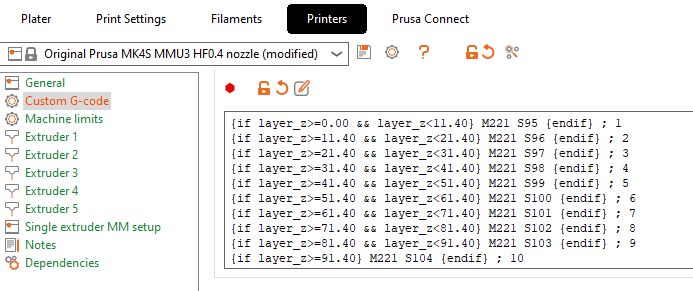
Add the code
{if layer_z>=0.00 && layer_z<11.40} M221 S95 {endif} ; 1
{if layer_z>=11.40 && layer_z<21.40} M221 S96 {endif} ; 2
{if layer_z>=21.40 && layer_z<31.40} M221 S97 {endif} ; 3
{if layer_z>=31.40 && layer_z<41.40} M221 S98 {endif} ; 4
{if layer_z>=41.40 && layer_z<51.40} M221 S99 {endif} ; 5
{if layer_z>=51.40 && layer_z<61.40} M221 S100 {endif} ; 6
{if layer_z>=61.40 && layer_z<71.40} M221 S101 {endif} ; 7
{if layer_z>=71.40 && layer_z<81.40} M221 S102 {endif} ; 8
{if layer_z>=81.40 && layer_z<91.40} M221 S103 {endif} ; 9
{if layer_z>=91.40} M221 S104 {endif} ; 10
This code will change the M221 (Flow percentage), and the print will dynamically test different settings inside the same print.
The provided code tests values from 95%-104% (1-10 labels), but you can customize it to your values.