
Framework NAS/media server with battery backup
We calculate the final price from your selected file. You review and accept it before payment.
Saved on this device.
Model information
- Source
- Printables
- Category
- Computers
- License
- Creative Commons — Attribution — Noncommercial
I wanted somewhere to securely backup my ever-growing pile of photos and documents, so I designed this small file/media server around the Framework 13 motherboard/battery. They're used in a pair for dual redundancy. Its main features are:
Very low idle power at ~12-14W (measured at the wall, with 3x SSDs)
Comes with its own UPS! Can run completely on internal battery power, for power outage resilience
Up to 56TB per server (or more as >8TB 2.5" SSDs are released in the future)
I ended up going with a Framework 13 motherboard since it has a highly efficient built-in UPS (just plug in the battery!) and has plenty of IO in the form of M.2 and USB C/Thunderbolt. Disks are powered from 2 of the motherboard's USB C ports (providing 7.5W+15W power, which is enough for around 2-3 SSDs per port), and the remaining 2 ports are exposed for data/charging.
It's also possible to swap the nvme SSD for a proper 2242 M.2 ethernet controller (on the A/E-key slot). However this will require some case redesign and add more idle power draw (due to a bug in the ASM1166 SATA controller power management when plugged into the M-key slot).
Features
Storage
6x SATA bays for 2.5" disks up to 9.5mm thick, or 4x bays for 15mm disks. (There is enough internal volume for you to design your own 6x 15mm drive cage if you want.)
1x NVMe SSD
Power
Idle power ~12-14W at the wall (tested with 2x SATA SSDs + NVMe SSD + ethernet + battery trickle charging)
fully battery-backed, reducing the risk of data corruption due to power loss
battery can be charge limited to 50% in BIOS to significantly improve battery longevity
SATA disk power provided by USB C ports (1 port can do 5V 3A, the rest 5V 1.5A). Custom DIY USB C to SATA power cables are required
External IO
2x USB C/Thunderbolt ports exposed for USB charging/data, or powering additional internal drives.
Compute
plenty of compute power/RAM, depending on the Framework 13 motherboard chosen (especially coming from my previous raspberry pi server). Upgradable in the future if necessary
Intel/AMD iGPU hardware acceleration for media transcoding
Cooling
negative pressure cooling - motherboard fan draws in air from the end of the case, over and under the motherboard and battery, and exhausts it through the side
dust filter slots are provided
Hardware to buy
Computer parts
Framework 13 motherboard + RAM
Framework 13 battery
NVMe SSD for system disk (optional - you can install the OS on the SATA disks if you want)
SATA disks (your choice of HDD or SSD)
Other electronics
M.2 to 6x SATA (ASM1166 chipset) - there's quite a few of these on aliexpress/ebay. Consider updating the chipset firmware before use (optional, instructions online)
40mm fan (to cool the ASM1166 chipset) - make sure it runs on 5V power
M.2 A/E key to M key adapter (an adapter with good cable shielding is recommended)
Cabling
(6x) SATA data cables (recommended 25cm length)
DIY USB C to SATA power cable parts:
(1x-3x) Molex to SATA power cables (1-to-2 or 1-to-3 adapter recommended, make sure the SATA connector is the crimped type, not molded)
(1x-3x) 2-pin molex connectors (male + female)
(1x-3x) USB C male plugs supporting 3A current (requires either some passive 5.1K pull-down resistors, or ones with an active emarker chip - both will work, according to my testing. Just don't get the ones with 56K pullup resistors, since those will limit you to USB A spec 0.9A current)
3-pin or 4-pin fan power connector (female), for your 40mm fan
Fittings
Screws (torx head)
(6x) M3x5 (pan head)
(2x) M3x16 (pan head)
(18x) M2x4 (countersunk)
(8x) M3x8 (countersunk)
(8x) M3x14 (countersunk)
per HDD
(4x) M3x5 (pan head)
(16x) threaded insert M2(OD3.2mm)x2.5
(13x) threaded insert M2(OD3.2)x3
(6x) threaded insert M3(OD4.2)x4
(10x) threaded insert M3(OD4.6)x5.7
3D printed parts list + fittings
Top
(4x) HDD cage side
(8x) M3x8 (countersunk) - holds the HDDs to the top panel
(4x per HDD) M3x5 (pan head) - holds the HDD cage panels to the HDDs
top panel left
(2x) M3x14 (countersunk)
(2x) M2x4 (countersunk)
top panel right
(2x) M3x14 (countersunk)
(2x) M2x4 (countersunk)
Screw blocks
bottom
(8x) threaded insert M2(OD3.2mm)x2.5
top
(8x) threaded insert M2(OD3.2mm)x2.5
Midframe
(6x) motherboard washer
(6x) M3x5 (pan head)
40mm fan guard
(2x) M3x16 (pan head)
midframe left
(4x) threaded insert M3(OD4.6)x5.7 - for securing the top/bottom panels
(2x) threaded insert M3(OD4.2)x4 - for the motherboard
(5x) threaded insert M2(OD3.2)x3 - for securing the battery clasps
midframe right
(4x) threaded insert M3(OD4.6)x5.7 - for securing the top/bottom panels
(4x) threaded insert M3(OD4.2)x4 - for the motherboard + M.2 A/E key adapter
(5x) threaded insert M2(OD3.2)x3 - for securing the battery clasps
midframe power switch
midframe M.2 stopper with 40mm fan
(2x) threaded insert M3(OD4.6)x5.7 - for the 40mm fan
Battery
battery top left
(2x) M2x4 (countersunk)
battery top right
(2x) M2x4 (countersunk)
battery bottom left
(2x) M2x4 (countersunk)
(1x) threaded insert M2(OD3.2)x3
battery bottom mid
(2x) M2x4 (countersunk)
(1x) threaded insert M2(OD3.2)x3
battery bottom right
(2x) M2x4 (countersunk)
(1x) threaded insert M2(OD3.2)x3
Bottom panel
bottom panel left
(2x) M3x14 (countersunk)
(2x) M2x4 (countersunk)
bottom panel right
(2x) M3x14 (countersunk)
(2x) M2x4 (countersunk)
Suggested print settings
material: PLA
layer height: 0.2mm
nozzle: 0.4mm
no supports required (but check part orientation before printing)
DIY USB C cable assembly instructions
Preparing the Molex to SATA power connector
remove the 12V cables from the SATA connector
remove the molex crimped pins from the 4-pin housing
insert the molex pins into the 2-pin housing (female)
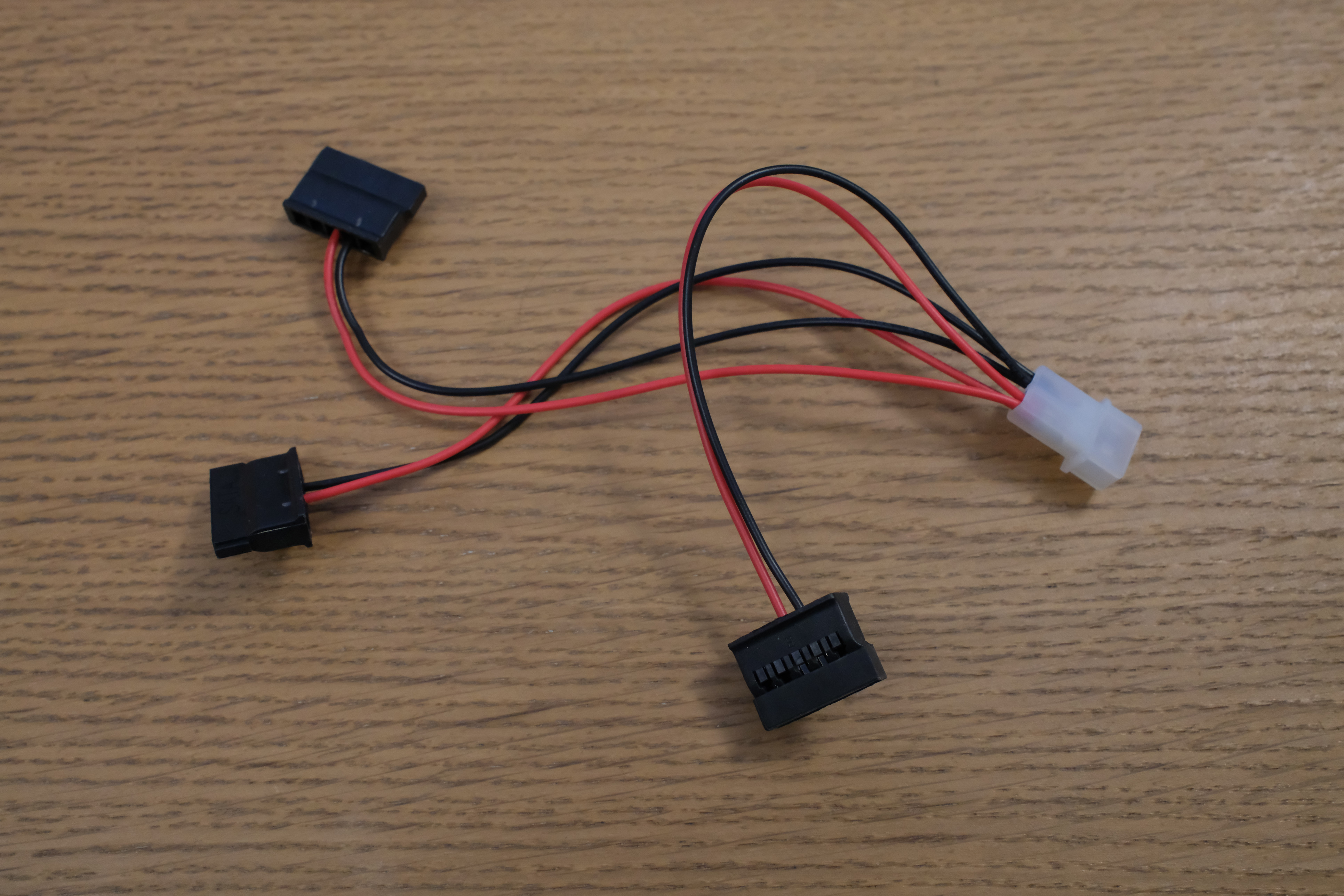
Preparing the USB C end
solder some wires to the USB C plug
additionally solder the fan header to the USB C plug
crimp on molex headers to the wires, and attach the 2-pin molex body housing (male)
attach some heatshrink
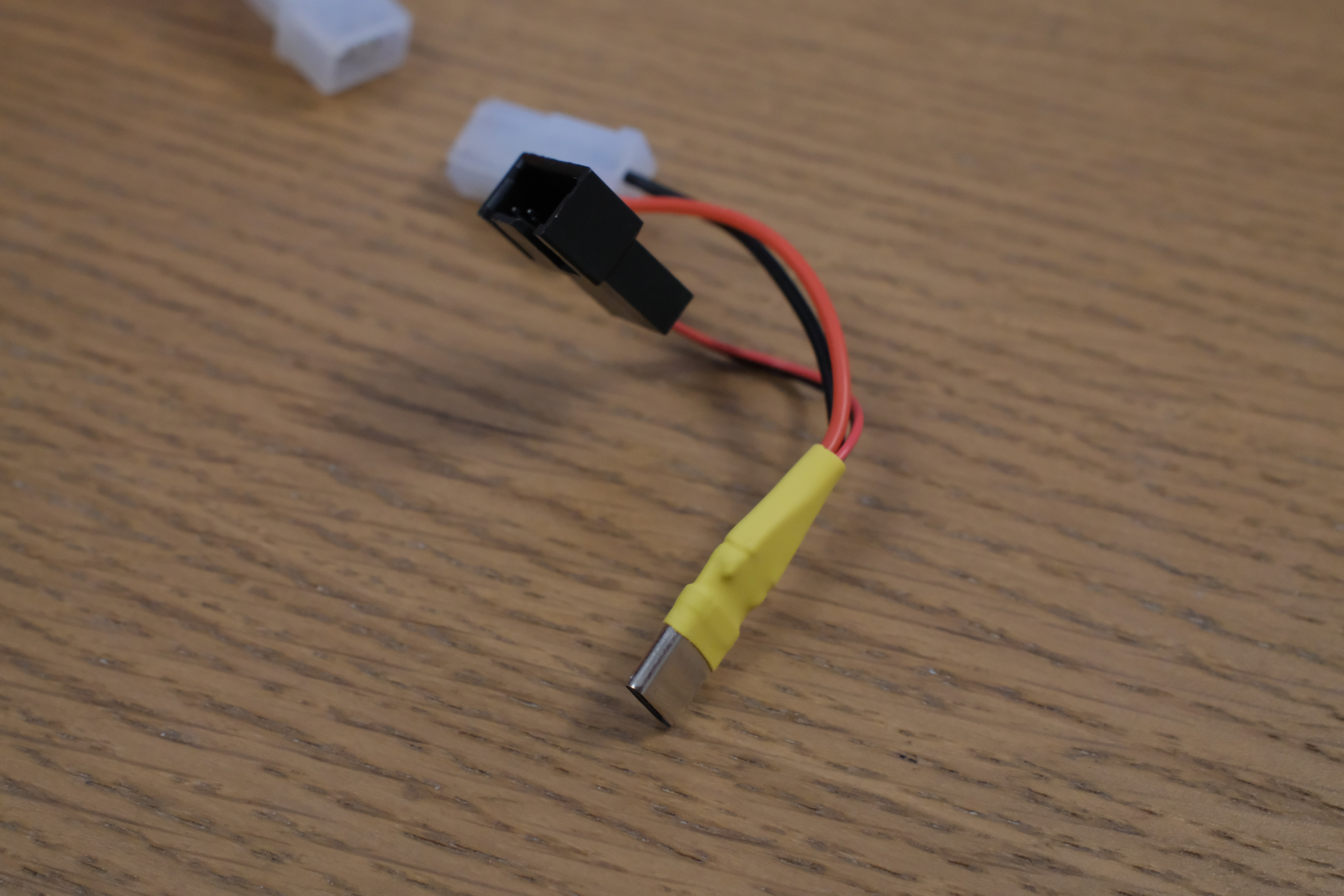
Assembly instructions
N.B. some of the photos show an older iteration of the case, but the assembly steps are pretty similar. Here's my recommended order:
assemble the midframe first - heat-set the threaded inserts, and then join both halves together by fixing them to the screw block
attach the battery blocks, and then screw in the battery
screw in the motherboard (using the plastic washers) and plug in the battery (this can be a bit fiddly)
plug the M.2 to SATA extension into the M.2 A/E key adapter, and slot it into the case. Plug the M.2 connector into the motherboard
screw the 40mm fan onto the M.2 stopper, and slot it into the case above
attach the HDD cage side panels to your HDDs. Screw in the HDDs to the top panel
attach the top and bottom panels
Notes
This can be a bit challenging to print, since it is a large multi-part model which requires sub-millimeter dimensional accuracy. Here are some tips from my own experience making this:
X/Y steps/mm - double check your X/Y steps/mm since the amount travelled can be slightly different from the theoretical number calculated from your motor/belt steps (e.g. I got a ~0.5mm difference per 1800mm travelled, probably due to manufacturing tolerances/thermal shrinkage)
extruder pressure calibration - setting up Klipper pressure advance/Marlin linear advance is very highly recommended
bed levelling/bed material - the midframe halves are large and have thin sections which can be prone to warping/curling. Make sure the bed is level. An enclosed chamber is highly recommended even for PLA printing, since it virtually eliminates warping. Pre-heating with a hairdryer to 35C is highly recommended.
The M.2 SATA adapter is intentionally plugged into Wifi/Bluetooth M.2 slot. This limits the bandwidth to 1GB/sec (PCIe 2.0 x1 link). You can plug it into main SSD M.2 for PCIe 3.0 x4, but this causes significantly more CPU power draw due to a bug in the ASM1166 causing the PCIe link to remain busy and the CPU to never drop below C2 idle state. Plugging it through the chipset's PCIe lanes allows the CPU to sleep properly.
The ASM1166 can overheat and cause SATA errors/lock up if stressed for multiple hours (e.g. when running btrfs balance). This is why a 40mm cooling fan was added.
If installing Debian, make sure to use the --force-extra-removable flag when installing GRUB. This prevents your OS becoming unbootable if you ever remove the system drive and put it back. This seems to be a quirk of Debian vs Framework's UEFI implementation.
Some nut inserts are a bit duplicated and should get unified in a future update, i.e. M3 nut inserts outer diameters are mixed between 4.2 and 4.6mm, and M2 nut insert lengths are mixed between 2.5 and 3mm.