
Creality k2 Plus Orca Profil 300h and Mulicolor
We calculate the final price from your selected file. You review and accept it before payment.
Saved on this device.

Creality k2 Plus Orca Profil
- Rating
- 0 / 5
- Likes
- 87
- Downloads
- 1,492
- Makes
- 1
- Views
- 5,731
- Reviews
- 0
Updated at source:
Model information
- Source
- Printables
- Category
- Creality Parts & Upgrades
- License
- Creative Commons — Public Domain
Hello Community,
Here is my profile for the Orca Slicer.
I have used my Creality K2 Plus for over 300 hours and modified the basic profile to this version. This profile is optimized for multicolor printing or printing with PETG/PLA. The basic Orca profile caused issues with the purge tower, but this has been fixed in my version.
I hope this profile saves you the testing and troubleshooting I went through to make it work.
Update: 07.01.2025 - Profile v2
Hello, I have updated the profile to version 2.
What’s new:
- Filament load and unload times are now included in the print time calculator.
This makes the estimated print time in Orca closer to the actual time. - Improved brim settings for multicolor prints.
With taller prints using two colors, the tower previously had issues sticking to the print bed; this has been addressed.
Supported Materials:
- PETG and PLA
- PLA 0.1 mm layer height
Recommended Filaments:
- Sunlu and Creality PLA: Ideal for precision figure printing.
- Improved settings for achieving a better first layer with PLA.
How to Use This Profile in Orca
- Open the provided
.3mffile in Orca Slicer.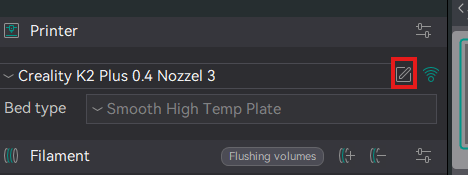
- Save the profile.
- Rename
- Save it to your user presets.
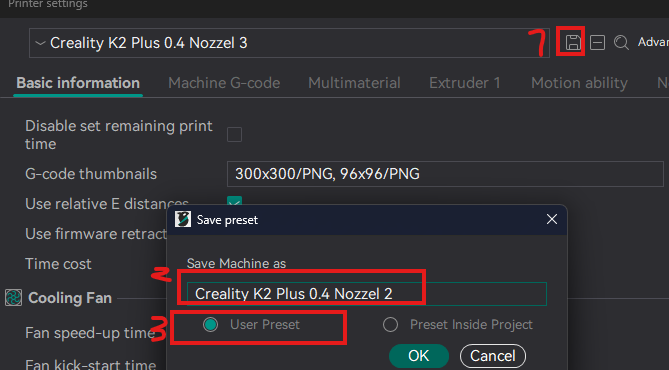
Congratulations!
You now have this printer profile available for every project, complete with all settings.
Connecting Orca with the K2
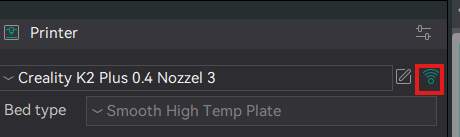
Host Type:
The K2 can connect via OctoPrint/Klipper or, with firmware version 1.1.1.7, via CrealityPrint.
I haven't noticed any significant differences between the two methods.
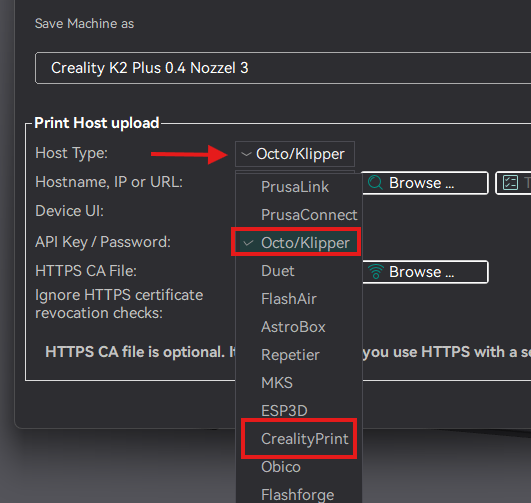
Enter the printer’s IP address (this can be found on the printer display).
Example: http://192.168.1.xxx:4408