
The Handsome Cable Organizer – Cable Winder | Large & Mini
We calculate the final price from your selected file. You review and accept it before payment.
Saved on this device.

Reusable cable winder in Large and Mini sizes, with textured grip, optional caps and an open-bridge Mini option.
- Rating
- 4.464 / 5
- Likes
- 1,995
- Downloads
- 8,206
- Makes
- 109
- Views
- 28,051
- Reviews
- 97
Updated at source:
Model information
- Source
- Printables
- Category
- Organizers
- License
- Creative Commons — Attribution — Noncommercial — NoDerivatives
Wind. Store. Go.
Keep your charging cables neatly wound in a reusable organizer with a textured outer grip. Choose Large or Mini, with an open-bridge Mini option for larger connectors.
Easy winding: a broad spool plate gives your fingers room to turn.
Two sizes: Large for longer cables, Mini for compact storage.
Support-free design: slice the parts without supports using the recommendations below.
Designed for everyday cables
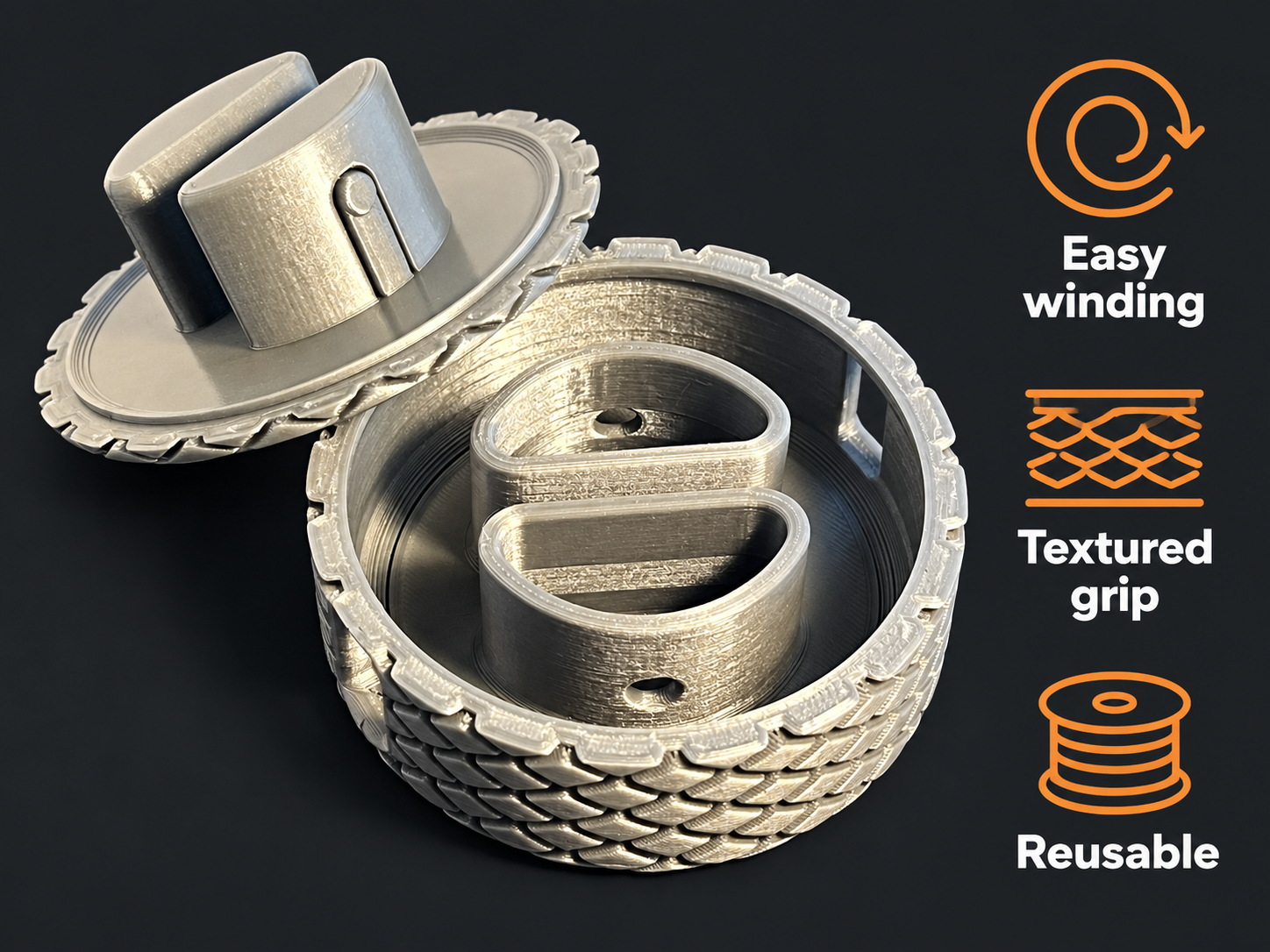
The rounded winding path guides the cable around the center. The textured outer shell and finger recesses on the standard cap help you hold and turn the organizer.
Choose your version
Large · 90 mm: for cables up to approximately 2 m.
Mini · 63 mm: the regular Mini is intended for USB-C cables up to approximately 1 m.
Mini Open Bridge · 63 mm: the open bridge makes it easier to insert cables with larger connectors. Choose the Mini_NoBridge file and a separate Mini cap.
Cable capacity depends on cable thickness and connector shape; length alone does not guarantee a fit.
Cap options: the main Large and Mini files contain the body and standard cap. Separate Cap_Plane (plain) and Cap_Fingerhutch (finger recess) files offer alternative caps. Use the cap matching the organizer size.
Printing
Material: PLA or PETG.
Layer height: 0.30 mm for Large; 0.20 mm for Mini.
Infill: 10% gyroid.
Supports: none for the recommended self-sliced setup.
These recommendations come from the original model instructions. Check the part orientation and preview in your slicer before printing.
Existing G-code: both files are for Large on a Prusa MK3S, using PLA and a 0.4 mm nozzle. Their saved settings differ from the recommendations above:
0.20 mm: 0% infill, 2 perimeters, supports disabled; estimated 7 h 30 min / 84.35 g.
0.30 mm: 0% infill, 3 perimeters, supports enabled in the saved profile; estimated 4 h 39 min / 94.72 g.
For Mini, another printer or PETG, slice the STL with your own profile.
Load and wind
Load: open the organizer and guide the cable through the central path. Choose the open-bridge Mini if its connector cannot pass through the regular Mini.
Close: align the two parts and seat the cap without trapping the cable.
Wind: hold the outer shell and turn the cap to wind the cable. Leave the connectors outside and stop before they press tightly against the shell.
Unwind gently when needed. Do not force a tight cable or a connector through an opening.
Deutsche Kurzanleitung
Wiederverwendbarer Kabelaufwickler mit griffiger Außenstruktur. Large (90 mm) ist für Kabel bis etwa 2 m vorgesehen, Mini (63 mm) für USB-C-Kabel bis etwa 1 m. Mini Open Bridge erleichtert das Einlegen größerer Stecker. Ob ein Kabel passt, hängt auch von Dicke und Steckerform ab.
Die Hauptdateien für Large und Mini enthalten Gehäuse und Standarddeckel. Bei Open Bridge den Mini-Deckel separat auswählen. Die zusätzlichen Deckeldateien heißen Cap_Plane (glatt) und Cap_Fingerhutch (Fingermulde); immer die passende Größe verwenden.
Druckempfehlung: PLA oder PETG, 10 % Gyroid, ohne Stützen. Large: 0,30 mm Schichthöhe; Mini: 0,20 mm. Die vorhandenen G-Codes gelten nur für Large, MK3S, PLA und 0,4-mm-Düse. Sie verwenden abweichend 0 % Infill; im 0,30-mm-Profil sind Stützen aktiviert. Für andere Kombinationen selbst slicen.
Benutzung: öffnen, Kabel durch die mittlere Führung legen, Deckel ausrichten und schließen. Außenring halten und am Deckel aufwickeln. Stecker außen lassen, nicht fest gegen das Gehäuse ziehen und beim Abwickeln keine Gewalt anwenden.
Printed one? Share a Make and show your color combination!
GiantBrain · CC BY-NC-ND 4.0