
ASUS AX-5400 Wall Mount
We calculate the final price from your selected file. You review and accept it before payment.
Saved on this device.

Wall mount for Asus TUF AX-5400
- Rating
- 0 / 5
- Likes
- 5
- Downloads
- 21
- Makes
- 0
- Views
- 132
- Reviews
- 0
Updated at source:
Model information
- Source
- Printables
- Category
- Computers
- License
- Creative Commons — Attribution — NoDerivatives
Summary
Wall mount holder for the ASUS AX-5400 router, designed for vertical installation.
The design provides a stable and secure mount without modifying the router housing.
Print Settings
Material: PETG (recommended)
Layer height: 0.2 mm
Nozzle: 0.4 mm
Infill: user preference (e.g. 20–30%)
Supports: required – automatic supports for the center part only
The model was printed in PETG. Other materials can be used, but PETG offers improved heat resistance and mechanical strength.
Assembly
The holder consists of three parts: left, center, and right.
The parts are assembled using six 3.5 × 35 mm wood screws.
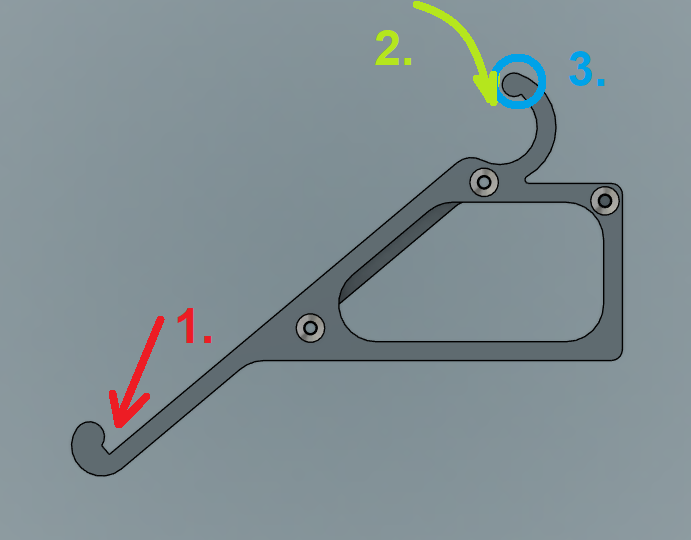
Router installation:
Place the front side of the router onto the lower supports of the holder.
Push the rear side of the router toward the upper clips.
Once the clips snap into place, the router is securely locked in position.
Notes
Using automatic supports for the center part only is recommended to ensure proper print quality and dimensional accuracy.