
Weather Station and Clock using CYD
We calculate the final price from your selected file. You review and accept it before payment.
Saved on this device.
Model information
- Source
- Printables
- Category
- Electronics
- License
- Creative Commons — Attribution — Noncommercial — Share Alike
CYD Weather Dashboard Case & Stand
This is a custom case and stand for the "Cheap Yellow Display" (ESP32-2432S028R) running a custom Weather Dashboard. It features a modular stand system and space for sensors.
3D Printed Parts
I have included several STL variants to fit your specific board and setup:
Case Variants: Files available for both Micro USB and USB-C versions of the CYD.
Stands:
Short Stand: For a lower profile.
Regular Stand: Standard height.
90-Degree Hinge: Allows the display to be mounted at a 90-degree angle. Note: My weather dashboard code currently only supports the standard orientation. The 90-degree hinge is included as an option for makers who want to use this case for their own projects or custom code.
Hardware Required
To build this project, you will need:
(Links provided as examples of the ones I purchased)
ESP32-2432S028R (Cheap Yellow Display)
DHT22 Temperature & Humidity Sensor (DHT11 could also work but must change code line 342 to 11)
MicroSD Card (Essential for configuration and assets)
1x JST Connector (1.25mm 4-pin recommended for the onboard socket)
6x M3x16 Screws
1x M3 Nylock Nut
Wiring Instructions
The DHT22 sensor connects directly to the left extended IO pins on the CYD.
There are 4 pins provided on the jst connector from the extended IO but only 3 will be used.
VCC: Connect to 3.3V / + (or 5V if your sensor requires it)
This is the first pin on the jst connector on my cable it was red
Data: Connect to Out (usually middle pin on the dht22)
This is the second pin on the jst connector on my cable it was black
This is marked as IO27 on the board
GND: Connect to GND / -
This is the forth pin on the jst connector on my cable it was grey
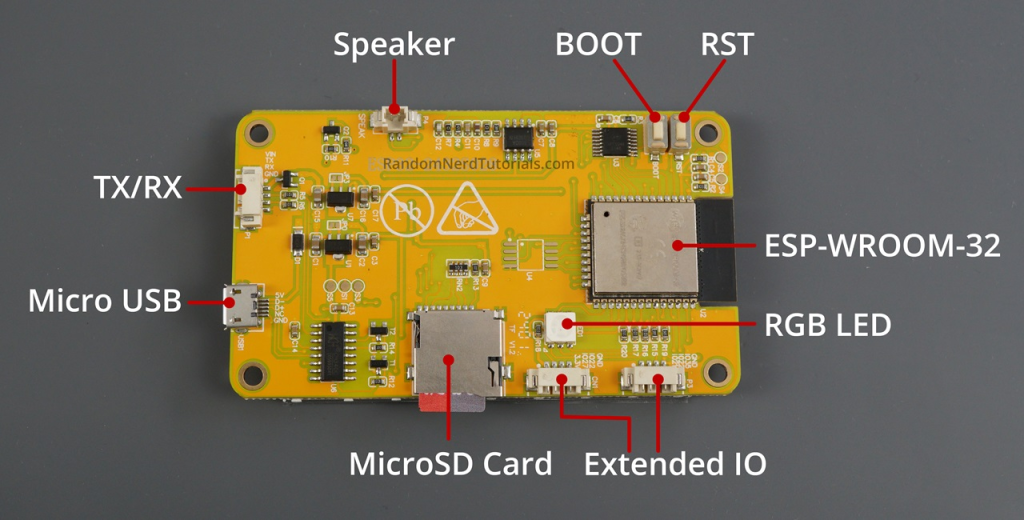
Image from https://randomnerdtutorials.com/lvgl-cheap-yellow-display-esp32-2432s028r/
Code, Setup, and SD Card
If you are new to the CYD (Cheap Yellow Display), I highly recommend starting with this guide to get your board set up and working before attempting to use my code: https://randomnerdtutorials.com/cheap-yellow-display-esp32-2432s028r/
Arduino IDE Settings & Libraries:
Partition Scheme: If you receive a compilation error saying the sketch is too large, go to Tools > Partition Scheme and select "Huge APP (3MB No OTA/1MB SPIFFS)".
Libraries: Install the following libraries in the Arduino IDE:
DHT sensor library for ESPx (by BeeGee_Tokyo)
lvgl 9.4
JSON_Decoder (by Bodmer)
OpenWeather (by Bodmer)
I have also included my User_Setup.h and lv_config.h files in case the ones provided in the guide above do not work for you (config files.zip)
SD Card Configuration: Important: WiFi credentials and your API key are not stored in the Arduino code. They are read from a text file on the SD card.
Format your microSD card to FAT32.
Copy all the provided SD Card files in the SD Card.zip (images in .bin file, and the configuration
.txtfile) directly to the root directory of the SD card.Open the configuration text file on your computer.
Enter your WiFi SSID, Password, and your OpenWeatherMap API key into the corresponding lines in the text file and save it.
Insert the SD card into the CYD and power it on.