
Dell C6100 HDD Cage Fan Mount
We calculate the final price from your selected file. You review and accept it before payment.
Saved on this device.
An adapter that mounts and powers a 92mm PC fan for the HDD cage from a Dell C6100
- Rating
- 0 / 5
- Likes
- 0
- Downloads
- 14
- Makes
- 0
- Views
- 361
- Reviews
- 0
Updated at source:
Model information
- Source
- Printables
- Category
- Electronics
- License
- Creative Commons — Public Domain
I wanted to use an HDD cage salvaged from an old Dell C6100 for my storage server, but the drives were getting very hot even with spaces left between them, so I thought up this contraption.
When inserted in to the middle HDD slot, it holds a 92mm PC fan and funnels its airflow over the drives above and below. Additionally, it can also provide 12V from the SATA power connector to the fan in a neat and tidy manner.
You'll need the following vitamins:
- 4x M4x30 countersunk screws (+ a countersinking bit to use on the fan holes)
- 4x M4 square nuts (Inserted mid print, you need to add a pause at height 7.8mm when slicing!)
- 4x M3x10 cap head screws
- 4x M3 square nuts
Optionally, for the SATA power feature:
- A butchered SATA extension cable (more info below)
- 2x M3x10 countersunk screws
- 2x M3 square nuts
SATA connector source
I already had some SATA extension cables lying around, so I butchered those to use as a power source. You can get them on eBay or AliExpress fairly cheap, just search for “sata extension” and look for this exact end:
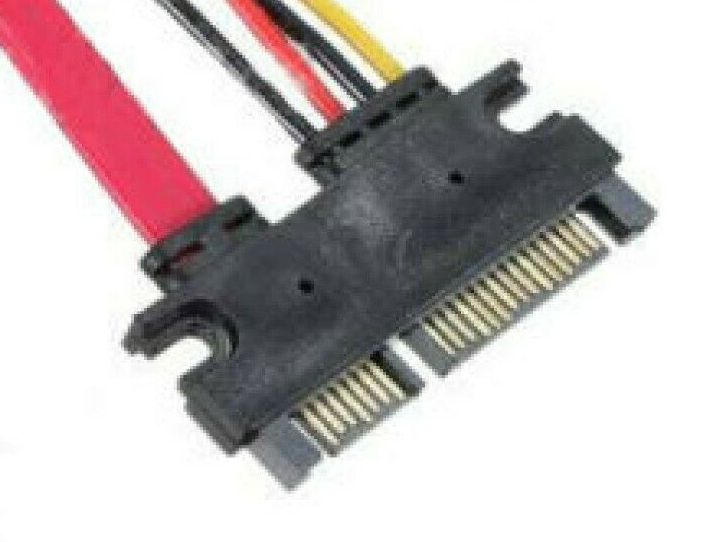
Notice the two mounting points on the sides, those are important. I can't guarantee that what you get will fit, but if you find a matching picture, I think the chances are good.
I just cut off the data cable right at the connector and trimmed the power wires to fit, then soldered them to a cutoff end of my fans cable. The yellow wire is 12V, which is what your fan will likely want (do check that for yourself, there are also 5V fans, which you can power off of the red wire). As for the fan cable pinout, Google is your friend :)
After soldering, I drilled some holes in the middle rib of the mount and ziptied the cables to it. You can trim the cables to the exact length and not cable manage them, but I usually leave slack on cut cables so I can reuse them in the future. It also makes soldering them together a whole lot easier.