
1 / 1
Slack Lack Enclosure - Customizable Magnet Sizes
Order a print of this model
We calculate the final price from your selected file. You review and accept it before payment.
Saved on this device.

Easily customizable magnet sizes for slack lack encloser.
- Rating
- 0 / 5
- Likes
- 6
- Downloads
- 21
- Makes
- 0
- Views
- 222
- Reviews
- 0
Updated at source:
Model information
- Source
- Printables
- Category
- Other Printer Parts & Upgrades
- License
- Creative Commons — Public Domain
I created a parametric Fusion 360 file so that all the parts with magnet inserts can easily be customized by setting your magnet size. Please check out the original design on Thingiverse for instructions and information about the Slack Lack.
I may also add custom variables for acrylic thickness and screw diameter if people are interested please let me know!
How to customize magnet sizes:
- Open the .f3d file in Fusion 360.
- In the top toolbar click on “modify” and then select “change parameters”
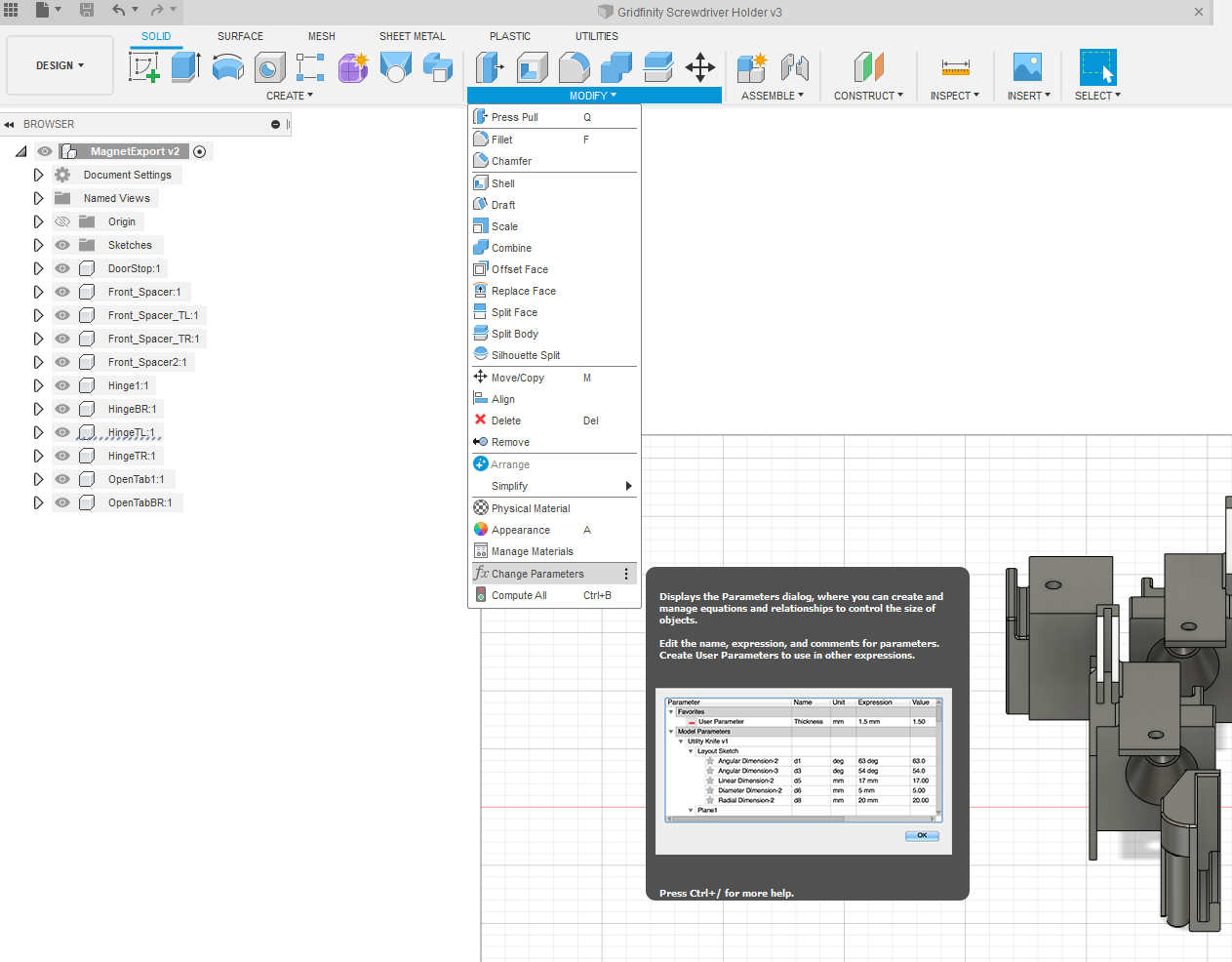
- Click on each of the three parameters and enter the values for the magnets you are using (you may want to enter numbers 0.5 mm or so larger than your magnet to account for print inaccuracies)

- Export the models by going to the utilities tab and selecting the “make” button. Select each part individually to export them as .stl file.