
Yubikey USB-A Mount for use with USB Extension cable
We calculate the final price from your selected file. You review and accept it before payment.
Saved on this device.

A mount that keeps a USB-A extender cable and a USB-A Yubikey in place for mounting to a surface.
- Rating
- 5 / 5
- Likes
- 14
- Downloads
- 88
- Makes
- 1
- Views
- 1,407
- Reviews
- 1
Updated at source:
Model information
- Source
- Printables
- Category
- Other Gadgets
- License
- Creative Commons — Attribution
Yubikeys are great for securing online accounts, but they are not particularly easy to find a home for on your desk. I am a user of the less expensive USB-A Yubikey and it has a major issue. Either it sticks up vertically in a USB hub or it sticks out of the side of a laptop so far that it is easily broken off by accident by simply pushing on it.
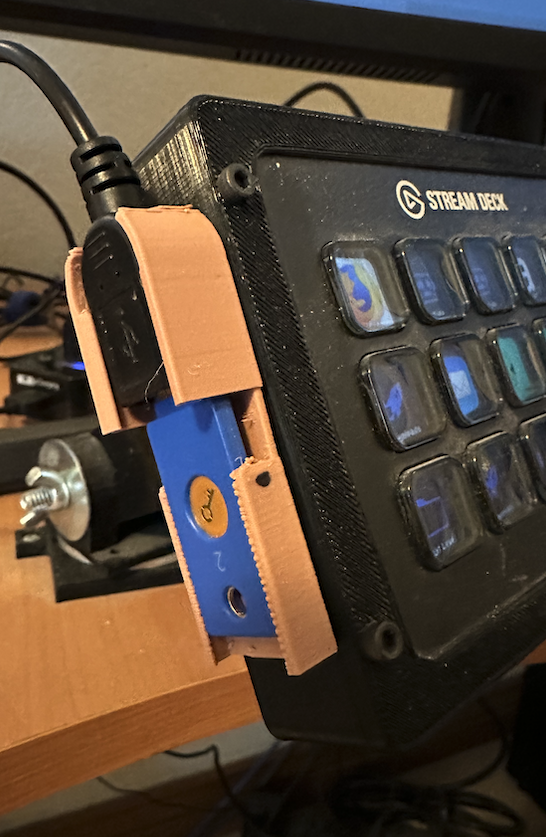
This mount is my solution. Using a standard USB-A male to female extension cable you can place the key anywhere you can find to stick it. The mount has a support underneath the Yubikey so it will not flex when you press the gold disk to generate a code.
Assembly:
- Gently insert the USB-A female head into the lower section. You might need to slightly bend the upper section back to get the clearance necessary to insert the USB head.
- Insert the Yubikey into the slotted section at the top with the metal disk facing out. Insert it into the USB female head.
- Mount it somewhere convienent. Double-sided mounting tape worked well for me. A “Command” mount will also work well in case you want to move it easily.
Note the section for the USB head and the Yubikey have some extra length as some USB heads are a bit longer.
Here is mine mounted on my Streamdeck.
Required Yubikey:
https://www.amazon.com/gp/product/B07M8YBWQZ/ref=ppx_yo_dt_b_search_asin_title?ie=UTF8&psc=1