
DUMMY 13 goes to COMIC CON - Tyrael V2.0
We calculate the final price from your selected file. You review and accept it before payment.
Saved on this device.
Tyrael from the Diable games
- Rating
- 0 / 5
- Likes
- 136
- Downloads
- 540
- Makes
- 0
- Views
- 3,134
- Reviews
- 0
Updated at source:
Model information
- Source
- Printables
- Category
- Action Figures & Statues
- License
- Standard Digital File License
12. Feb. 2024 V2.0:
Visual improvements
- New scarf
- New hood
- New armor
- scarf mounts with jewelry
21. Jan 2024 V1.1 :
- Multi-part sword added
Based on DUMMY 13 Beta - Oct. 2023
| DUMMY 13 Printable Jointed Figure © 2023 by Lucky 13 Toys is licensed under CC BY 4.0 |
Get your Dummy 13 here: /model/593185
DUMMY 13 loves COMIC CON!
So I have started to design a whole series of characters and costumes for DUMMY 13. This is another costume from the series "DUMMY13 goes to COMIC CON".
The aim is to preserve the charm and simplicity of Dummy 13.
Get more:
- My collections /@Mici/collections
----------------------------------------------------------------------------------------------------------------
Content of TyDUMMel, sorry Tyrael:
- Hood to use with an original black head
- Big deadly sword
- Light wings
- Spikes
- Armor
- Scarf and mount
- Other parts are standard parts
Printing:
I have provided a 3MF file (Prusa slicer) but please double check the settings.
Assembly:
|  |
|  |
|  |
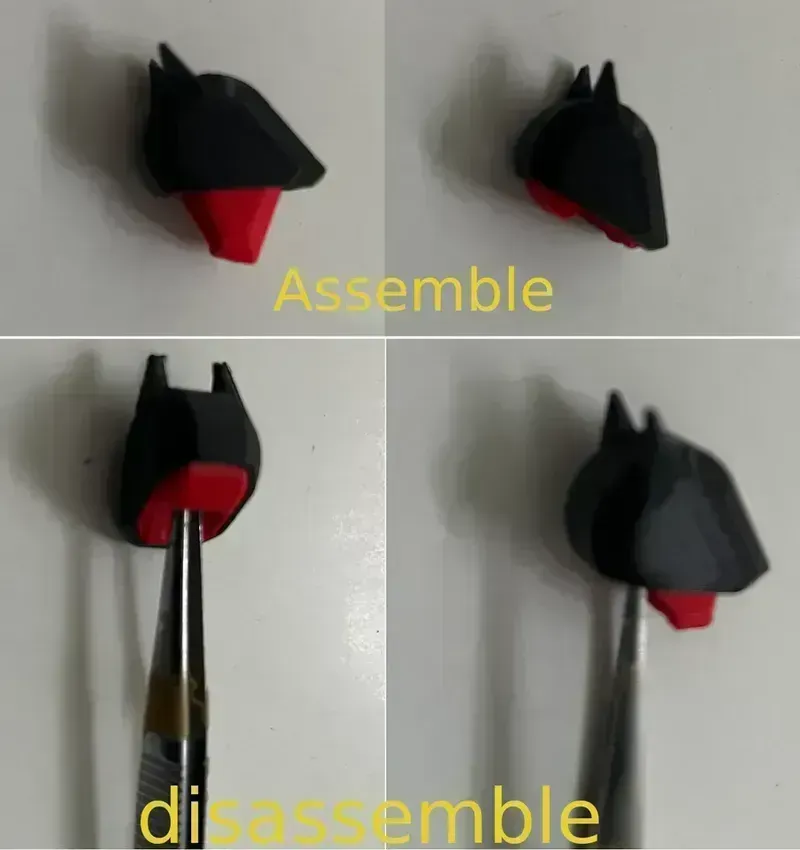
Slide the head into the hood and press it in with gentle force on the chin. If this is not possible, it is probably due to the following points:
|  |
You can also see in the pictures:
| DUMMY 13 - Acrobatics pedestal - Pose stand /model/692455 |  |