
1 / 2
Prusa MK3s+ and MMU3 - Orca Slicer profile
Order a print of this model
We calculate the final price from your selected file. You review and accept it before payment.
Saved on this device.

Working profile in Orca Slicer for a Prusa MK3s+ and MMU3
- Rating
- 5 / 5
- Likes
- 67
- Downloads
- 970
- Makes
- 3
- Views
- 3,247
- Reviews
- 4
Updated at source:
Model information
- Source
- Printables
- Category
- Prusa Parts & Upgrades
- License
- Creative Commons — Attribution — Share Alike
Working profile in Orca Slicer for a Prusa MK3s+ and MMU3.
Tested with 1000+ tool changes with no cloggs and only one user error :D
This is no longer getting updated since I sold my MMU3.
Video guide
Instructions to import the profile
- Add the "Prusa MK3s+" using Orca Slicers “Select/Remove printers(system presets)”
- Unzip the .zip file
- Import the config by selecting file > import > import configs
- Adjust the filament settings if needed, look at the 2 pictures below for my settings for PLA(210 °C)
- That's it. Let me know if you encounter any problems :D
Filament settings > Multimaterial
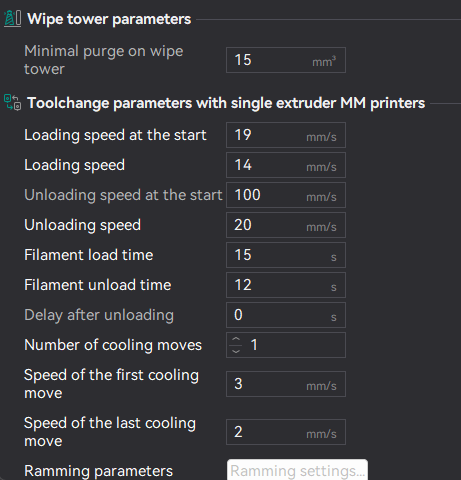
Filament settings > Multimaterial > Ramming settings

Change Log:
29/07/2024 - Toolchange parameters: Improves the time it takes to unload and load filament and the filament tip is more consistent