
MODULITH Prusa Core One Kit
Obliczymy ostateczną cenę na podstawie wybranego pliku. Sprawdzisz ją i zaakceptujesz przed płatnością.
Zapisane na tym urządzeniu.

Turn the empty space under your Prusa Core One into MODULITH drawer storage.
- Ocena
- 4,938 / 5
- Polubienia
- 329
- Pobrania
- 686
- Wydruki
- 33
- Wyświetlenia
- 11 900
- Oceny
- 32
Aktualizacja u źródła:
Informacje o modelu
- Źródło
- Printables
- Kategoria
- Prusa Parts & Upgrades
- Licencja
- Creative Commons — Attribution — Noncommercial — Share Alike

Storage that lives right under your printer.
Uses space you already have. Printed rails and brackets mount under the Core One, and MODULITH 240 drawers slide in below. The 240 length matches the Core One build plate, so every rail prints in one go.
Go taller with 2H feet. Print the 1H feet for a low setup, or step up to the optional 2H feet and fit up to 3W-2H of storage under the printer.
Fill it with something useful. The Core One/MK4 Tool Insert gives every tool from the Prusa box its own spot in a 240 2W-1H drawer.
Looks right at home. EdgeLabel faceplates keep the handle clear of the table and look great next to the Core One, especially printed in Prusa orange.
GEN2 is now MODULITH. Same system, same compatibility. Print only what you need, snap it together with QuickLock, and rearrange or expand your storage anytime.
WHAT'S IN THE DOWNLOAD
Kit: 240-1W and 240-2W rails, front and rear brackets (STL and 3MF)
1H feet: print 4
Optional 2H feet: front left, front right and rear feet, brackets, plus a pre-sliced set
Optional: the example 240 cases and Decor drawers from the video, and MODULITH hardware (QuickLocks, Bi-Directional QuickLock, drawer stoppers, magnet inserts)
WORKS WITH MODULITH 240 DRAWERS
The rails take any 240 drawer. These are the ones from the video:
Shorter drawers like the 185 fit too, using the Bi-Directional QuickLock.
FILL IT UP
Give the tools from your Prusa box a proper home:
And the faceplate I recommend for this kit:
LET THE FREE PLANNER HANDLE THE DETAILS
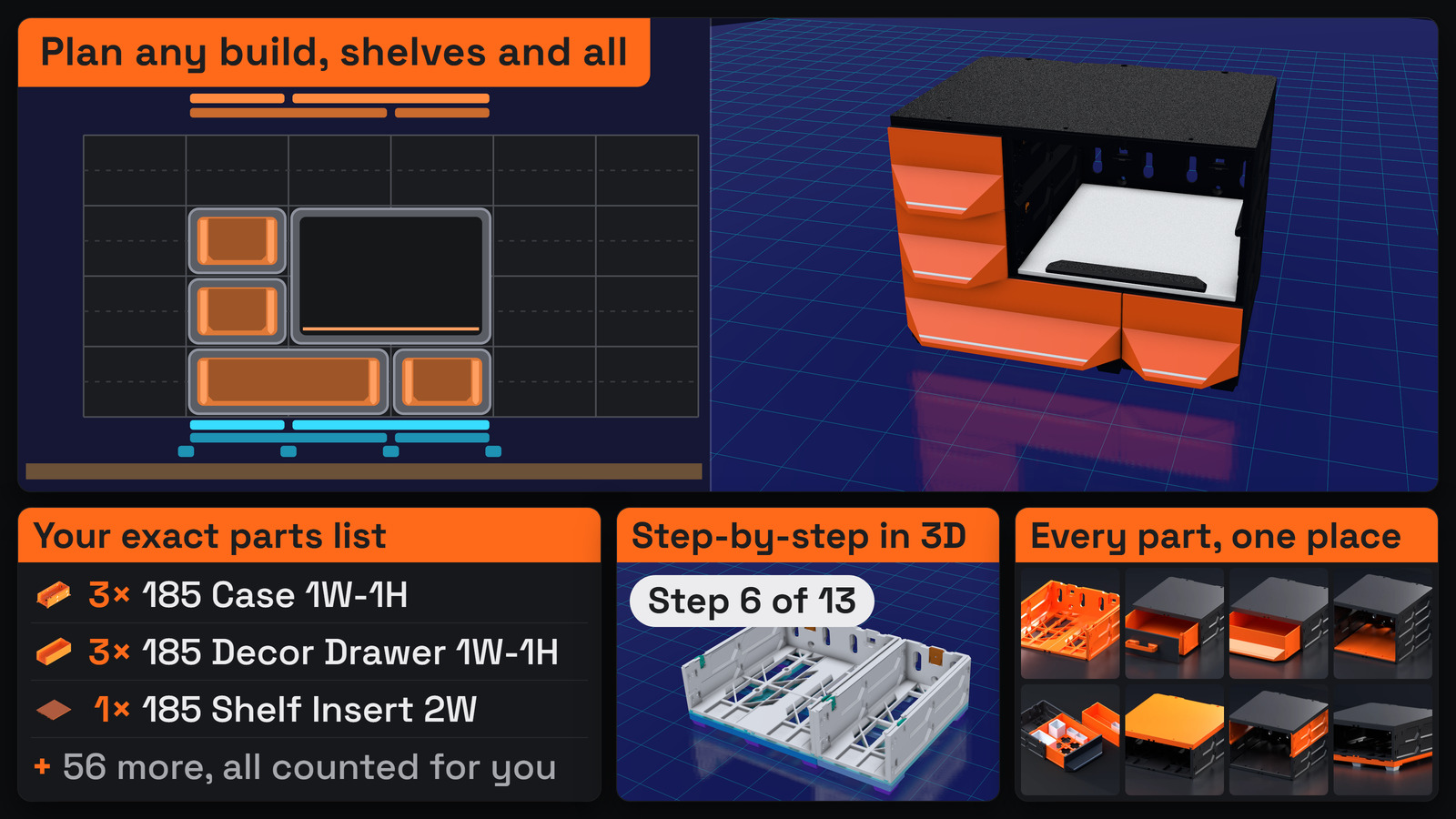
Not sure which sizes you need? Build your layout in the free MODULITH Planner and it works out the parts for you, hands you a complete parts list with download links, and generates a step-by-step 3D assembly guide for your exact setup.
👉 Open the free MODULITH Planner →
WHAT YOU'LL NEED
M3 nuts and screws: stainless steel or steel (paid links)
The screwdriver and hex keys that came with your Core One
Optional: double-sided tape (better than what I used in the video, paid link)
As an Amazon Associate I earn from qualifying purchases.
INSTRUCTIONS
The video walks through the whole install step by step:
Detailed visual instructions →
Going taller? 2H feet instructions →
Touchscreen tip: the Core One screen can make 0.5H drawers fiddly to get in and out. It is only held on by magnets, so open the door and gently lift the screen a little and the drawer slides right in.
PRINT SETTINGS
1H feet: 4 perimeters, 25% gyroid infill
2H feet: 4 perimeters, 20% adaptive cubic infill
Everything else: 3 perimeters, 15% infill
Good bed adhesion keeps the rails straight. If prints lift near the edge of your plate, clean it with dish soap and water and try an adhesion promoter.
REPLACEMENT FEET
Lost the original feet? Jim Nangano made TPU replacement pads: grab them here →
SUPPORT MODULITH AND UNLOCK MORE
Join the Jerrari Club for member-exclusive models and early access. Every membership helps fund new MODULITH releases and free tools like the Planner. Or pick up a premium faceplate collection.
NEW TO MODULITH?
🎥 Watch the system overview:
UPDATES
2026-10 - Page refreshed for MODULITH (formerly GEN2), now paired with the Core One/MK4 Tool Insert.
2026-02 - Optional 2H feet added, fitting up to 3W-2H under the printer.
2025-06 - First release.
This model is licensed CC BY-NC-SA 4.0. The Non-Commercial part refers specifically to selling prints. You’re absolutely welcome to use my designs in commercial environments, I actually encourage you to use them anywhere you see fit! 👍