
Dancing Penguin Automata
Obliczymy ostateczną cenę na podstawie wybranego pliku. Sprawdzisz ją i zaakceptujesz przed płatnością.
Zapisane na tym urządzeniu.

Dancing Penguin powered by a cheap stepper motor and an Arduino Nano. Modelled on the teams penguin emoji.
- Ocena
- 0 / 5
- Polubienia
- 41
- Pobrania
- 100
- Wydruki
- 1
- Wyświetlenia
- 1067
- Oceny
- 0
Aktualizacja u źródła:
Informacje o modelu
- Źródło
- Printables
- Kategoria
- Sculptures
- Licencja
- Creative Commons — Attribution — Noncommercial — NoDerivatives
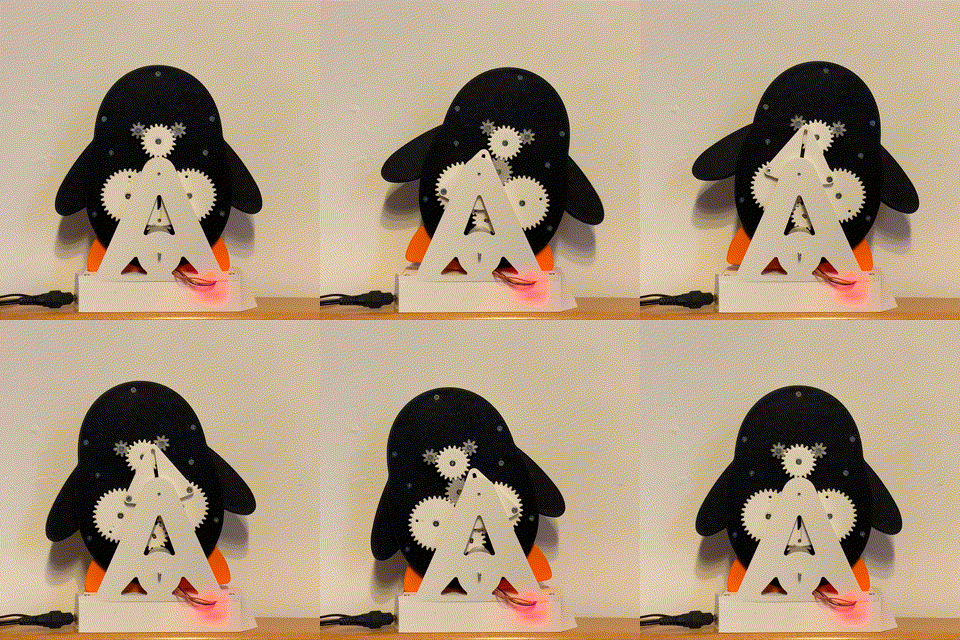
You love the dancing penguin emoji? Great!
Then build your own dancing penguin! All the motion is driven by one cheap stepper motor and an arduino! No need for servos.
Here is what you will need:
- 1x Arduino Nano
- 1x 28BYJ-48 with ULN2003 Driver
- 1x On-/Off Switch
- 1x DC connector 5.5 x 2.1mm
- 1x 12V power supply with 5.5 x 2.1mm jack
- a few patch cables for wiring
- M3 screws:
20 times M3x10mm
10 times M3x16mm
5 times M3x30mm
Prints were tested with PLA, ASA and PETG.
Layerheight: 0,2mm
Infill: 15% with 2 Perimeters
Important: Print the gear that attaches to the motor shaft with 100% infill.
Known limitations:
- The penguin dances slower than the emoji. I don't mind, but maybe I'll make a faster version with two stepper motors at some point. If you're interested, let me know.
- The gear that attaches to the motor shaft can wear out over time. Make sure to print this gear with 100% infill.
- Long-term performance is currently unknown. Feel free to give feedback.
- Friction is a problem at the moment. Experiment with how much you thighten the screws.
Video with assembly instructions
https://vimeo.com/880571363?share=copy
Arduino Code
#include <Stepper.h>const int stepsPerRevolution = 2048;  // change this to fit the number of steps per revolution
// ULN2003 Motor Driver Pins
#define IN1 4
#define IN2 5
#define IN3 6
#define IN4 7
//internal LED
#define LED 13
// initialize the stepper library
Stepper myStepper(stepsPerRevolution, IN1, IN3, IN2, IN4);
void setup() {
  pinMode(LED, OUTPUT);
  digitalWrite(LED, HIGH);
  // initialize serial port
  Serial.begin(9600);
  Serial.println("\nPenguin!");
  // initialize stepper motor
  myStepper.setSpeed(20);     //Range @5V: 1-15 rpm
digitalWrite(LED, LOW);

}
void loop() {
  if (true)
  {
myStepper.step(stepsPerRevolution);
  }
  else
  {
    digitalWrite(IN1, LOW);
    digitalWrite(IN2, LOW);
    digitalWrite(IN3, LOW);
    digitalWrite(IN4, LOW);
  }
}