
Flat XDA Icon Keycaps
Obliczymy ostateczną cenę na podstawie wybranego pliku. Sprawdzisz ją i zaakceptujesz przed płatnością.
Zapisane na tym urządzeniu.

A collection of flat xda keycaps with different icons.
- Ocena
- 0 / 5
- Polubienia
- 24
- Pobrania
- 173
- Wydruki
- 0
- Wyświetlenia
- 1278
- Oceny
- 0
Aktualizacja u źródła:
Informacje o modelu
- Źródło
- Printables
- Kategoria
- Other Ideas
- Licencja
- Creative Commons — Attribution
I added the icons in OrcaSlicer and because of this I can only export this as a 3MF file that is compatible with Bambu Studio/OrcaSlicer. I'm sorry :(
---------------------
I uploaded profiles for a single blank keycap and all icon keycaps together for a 0.4mm nozzle and a 0.2mm nozzle.
I highly recommend printing this with a 0.2mm nozzle!
I did print a few of these keycaps with a 0.4mm nozzle for test purposes and they did work (you can see these in the third picture) but I can't guarantee that every design will print well (for example the D20 most likely wouldn't work).
In the slicer the icons only show after slicing and not in the preview. But every keycap should have a name in the object tab.
Easiest way tro add your own icons (with OrcaSlicer):
- Get the icon you want as a SVG
- Make sure your blank keycap is centered on the build plate (Right click build plate > “Arrange”)
- Right click blank keycap > “Add part” > “SVG”
- Select your SVG
- Drag it under the keycap (onto the part that will be the top of the keycap)
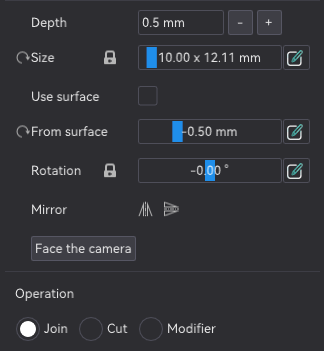
- Change settings to your liking
- In the object tab at the left side navigate to your SVG, then right click > “Center” to make sure it's in the center of the keycap
These are the SVG settings I used for the keycaps as a reference.
Most Icons are from here: https://www.discotools.xyz/de/icons-editor
And this is the 3D printed Macropad in the picture: https://scottokeebs.com/blogs/macropads/scottodeck-handwired-macropad