
Bentobox v2.0 5015 Pull Vertical orientation for Creality K1/K1C
Obliczymy ostateczną cenę na podstawie wybranego pliku. Sprawdzisz ją i zaakceptujesz przed płatnością.
Zapisane na tym urządzeniu.

Re-re-remix of Bentobox using 2x5015 pulling the air in vertical orientation for Creality K1/K1C
- Ocena
- 5 / 5
- Polubienia
- 104
- Pobrania
- 428
- Wydruki
- 3
- Wyświetlenia
- 5987
- Oceny
- 4
Aktualizacja u źródła:
Informacje o modelu
- Źródło
- Printables
- Kategoria
- Creality Parts & Upgrades
- Licencja
- Creative Commons — Attribution — Noncommercial — Share Alike
This is another remix of Bentobox, but this version using 2x5015 fans to fit on Creality K1.
The original version of Bentobox uses 2x4020 axial fan. This fan don't have much static pressure to move air through the filters. Radials fans are much better to do this job.
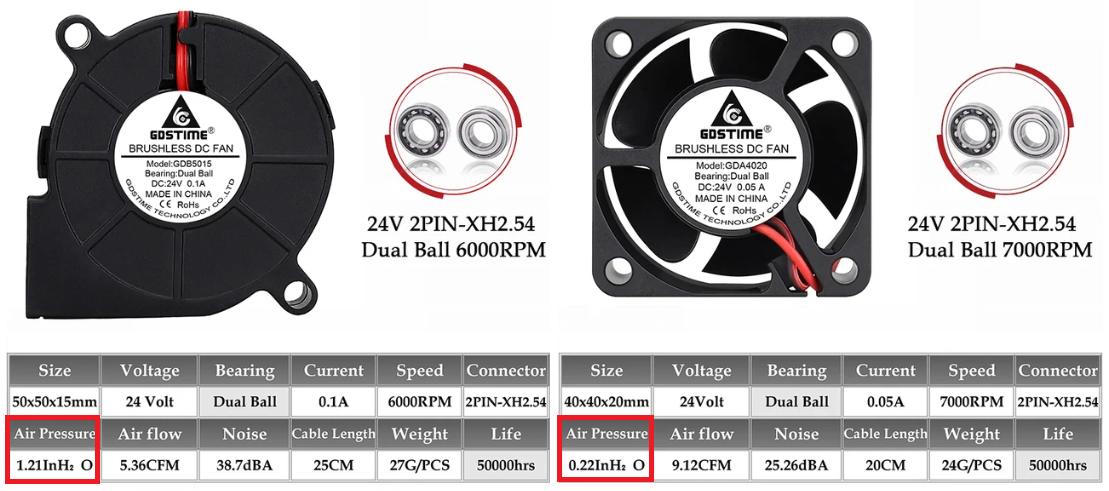
In this example, 5015 have 5.5x times more air pressure than 4020!!! A difference too big to be ignored!!!
There are several bentobox remixes using 5015 pulling air, but all in horizontal orientation. This causes a problem on K1, because when positioned in this orientation the model becomes fatty and you lose vertical printing area.
I design this model to solve this problem, and now you can use the best 5015 fans on K1 without lose any print area.
Bill of Material:
- 12x 6x3mm magnet
- 2x 5015 24V Fan
- 1x Conector XH2.54 2Pins
- 2x M4x12mm screw
This is just part of the bentobox material, and using original model reference, you need to purchase the rest of the parts to complete the model.
The original model of bentobox uses 4x2mm magnets. I used 6x3mm magnets just because I alredy had these magnets. If you want, can easily remix this model to go back to 4x2mm magnets. If you alredy had the rest of bentobox using 4x2mm magnets, can use this model with 6x3mmm, it's fully compatible.
Configuration on rooted K1 to auto manage the fans
Connect the two 5015 fans to the xh2.54 connector, and connect to the PA0 pin on the K1 motherboard.
Add on print.cfg file
[output_pin bento]
pin: PA0
pwm: True
cycle_time: 0.0100
hardware_pwm: false
value: 0.00
scale: 255
shutdown_value: 0.0
add on fan-control.cfg file
[duplicate_pin_override]
pins: PA0, PC0, PC5, PB2, ADC_TEMPERATURE[temperature_fan bento_fan]
pin: PA0
cycle_time: 0.0100
hardware_pwm: false
max_power: 1
shutdown_speed: 0
sensor_type: EPCOS 100K B57560G104F
sensor_pin: PC5
min_temp: 0
max_temp: 70
control: watermark
max_delta: 2
target_temp: 35.0
max_speed: 1.0
min_speed: 0.5
With this config, when temp reaches 35ºC, the fan auto start and turn off when down below. And it's possible to manually start/stop on Fluidd/Mainsail control panel too.
If you like my work, don't hesitate to support me by paying me a ☕. Thank you 🙂