
1 / 3
Generic USB Webcam Housing
Order a print of this model
We calculate the final price from your selected file. You review and accept it before payment.
Saved on this device.
Model information
- Source
- Printables
- Category
- Photo & Video
- License
- Creative Commons — Attribution — Share Alike
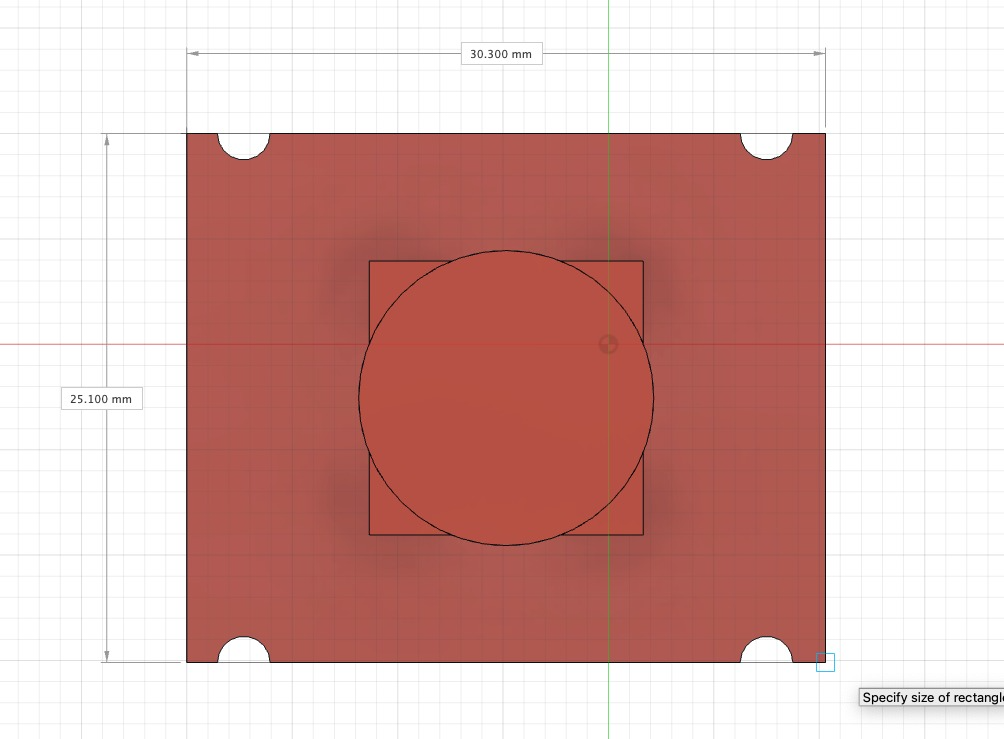
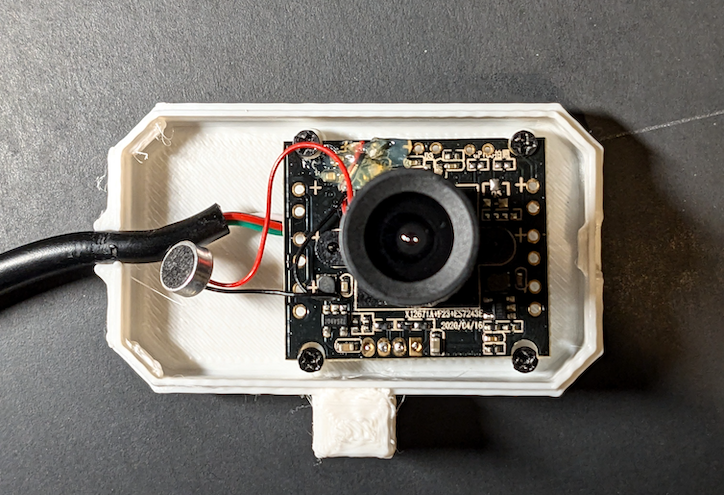
Make sure to take apart your webcam and see if the board matches the one shown in the image. I'm not sure how else to identify the model; if you have any ideas please leave a comment. The case snaps shut, but should still be easy enough to take apart if needed.
Assembly:
- Take apart the original webcam housing. There should be a microphone connected to the front half, so be careful in removing it.
- Unscrew the 4 screws connecting the PCB to the case. Use the same 4 screws to attach the PCB into your new case.
- While keeping the two halves near, fit the mic into the front half of the case. It should pressure-fit in, but depending on your tolerances you might need to adjust the hole or use glue.
- Close the case, making sure that the cable is in its slot. It should just snap shut!
Make sure your PCB is 30.3x25.1mm, designed roughly as shown.
Print Settings:
Printer: Ender 3 v3 SE, 0.4mm nozzle
Material: PLA
Layer Height: 0.2mm
Infill: 100%
Support: Yes, for the top piece (be careful not to break the snap fit legs when removing support from the top half)