
The (Best) First Layer Test.
We calculate the final price from your selected file. You review and accept it before payment.
Saved on this device.

This will test functions that the simple squares cannot test.
- Rating
- 0 / 5
- Likes
- 5
- Downloads
- 43
- Makes
- 0
- Views
- 119
- Reviews
- 0
Updated at source:
Model information
- Source
- Printables
- Category
- Test Models
- License
- Creative Commons — Attribution — Share Alike
This model will test:
Z offset
Bed Cleanliness
First Layer Flowrate
First Layer Speed
Bed Temp
Round and Sharp Corners
Gapping
Bed Adhesion, and more!
I use this on my Neptune 4 to insure I have good settings, before committing to a long print. This reduces chance of the famous “Blob of Death” This is a great model to test first layer infill speed and line speed. It only takes 2-3 minutes.
Troubleshooting:
Nothing is sticking and it looks like spaghetti = Your nozzle is too high. Lower your nozzle (Z offset) Check Image Below
The straight lines are sticking, but not the round ones. = Clean you bed, and if issue persists, lower your nozzle (Z offset) Check Image Below
Every line stuck down, but the infill looks horrible = Your nozzle is too low. Raise your nozzle. (Z offset) Check Image Below
Every line stuck down, but there are significant gaps in the infill = Your nozzle is too high. Lower your nozzle. (Z offset) Check Image Below
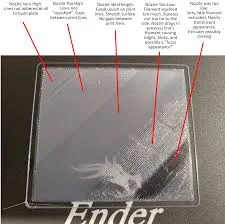
Tips:
Clean your bed every 10-15 prints.
Don't touch your bed with your fingers or any oily substance. Pick it up at the edges to reduce this.
Use a scrapper! I like ThreeD Michaels's scrapper (https://www.printables.com/model/832209-optimized-bed-scraper-xl). If you want a gridfinity holder for it, check here → https://makerworld.com/en/models/1181792-optimized-bed-scrapper-xl-holder
Lower your first layer speed. Anywhere from 40-60mm/s is good.
I hope this model and these tips will help you, If so, please drop a boost or a like!