
Garage Parking Assistant
We calculate the final price from your selected file. You review and accept it before payment.
Saved on this device.
Model information
- Source
- Printables
- Category
- Garage
- License
- Creative Commons — Attribution — Noncommercial — Share Alike
🚗 Garage Parking Assistant
Laser-guided LED parking helper for tight garages
Never hit the wall again.
This DIY parking assistant helps you stop in the perfect position every time when entering a small or tight garage. Using a laser distance sensor and RGB LED feedback, the system clearly shows how close the vehicle is to the wall ahead.
Perfect for daily use, repeatable parking, and protecting your bumper.
✨ How It Works
When the car approaches from more than 5 meters away, the sensor detects movement and starts a short startup animation (a full green ring sweep animation) as a loading effect.
As the vehicle gets closer, the LEDs gradually change:
🟢 Green = safe distance
🟡 Yellow = getting close
🔴 Red = stop soon
When the vehicle reaches the final 20 cm zone, the device displays a short stop animation shown as a horizontal line pattern (-)
When leaving the garage, the sequence runs in reverse. Once distance exceeds 5 meters, all LEDs switch off automatically. If no movement is detected, the LEDs also switch off after 2 minutes.
🔥 Why You’ll Want This
Protect bumpers and walls
Park consistently every time
Clear visual guidance
Clean wall-mounted design
Significantly cheaper than factory parking sensor systems (front sensors).
Fully customizable in software
🖨 Difficulty Level
Intermediate DIY Project
Recommended skills:
Basic soldering
Basic electronics knowledge
Arduino IDE basics
General 3D printing experience
🧰 Required Hardware
Electronics
1x DFRobot SEN0337 ToF laser distance sensor
Mechanical Parts
1x Corrugated tube
7 mm inner diameter / 10 mm outer diameter / approx. 60 cm length or longer1x M2.5x4 ISO 4762 / DIN 912 screw
(used to hold the XIAO board in place)4x M5x16 ISO 7380-1 / DIN 7380 screws
(used for the lid with NeoPixel cover)5x M4x22 countersunk screws for plastic inserts
(used to mount the main and sensor unit to the garage wall)
Others
1x Clear plastic blister packaging piece
thickness below 0.5 mmSome heat shrink tubing
Old phone charger with USB-C cable
🖨 Recommended Print Settings
Designed for ABS for improved durability in garage environments.
Scale: 101% (ABS shrink compensation)
Use text sheet / textured sheet
Glue stick recommended
Use brim to reduce warping
Enclosure strongly recommended
Allow print to cool fully before removal
🔌 Wiring Guide
https://circuitcanvas.com/p/o9msbz18zr3mhe9sd46
Sensor ↔ XIAO (UART)
Sensor | XIAO |
|---|---|
RX | TX (Pin 7) |
TX | RX (Pin 6) |
⚠ RX/TX must be connected diagonally.
Power Wiring
New Wiring Version (most common)
Sensor | XIAO |
|---|---|
VCC | VCC |
GND | GND |
Old Wiring Version (early units - my use case)
Sensor | XIAO |
|---|---|
VCC | GND |
GND | VCC |
⚠ Always verify your cable version before powering the board.
Sensor documentation:
https://wiki.dfrobot.com/sen0337/#tech_specs
NeoPixel ↔ XIAO
NeoPixel | XIAO |
|---|---|
VCC | VCC |
GND | GND |
IN | D0 (Pin 0) |
🛠 Assembly Guide
1. Prepare Wiring Harness
I recommend starting with the cable harness first.
The ToF sensor comes with a cable. Cut off the section with the separate male connectors.
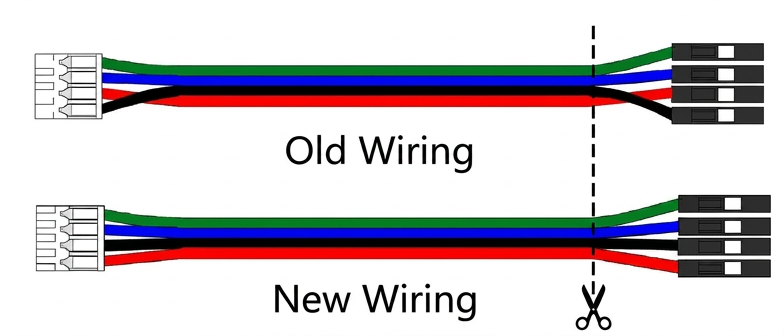
Decide how far the main unit will be from the sensor module.
Leave approximately 15–20 cm extra cable that go outside main unit (for soldering purpose).
Then:
Cut corrugated tube to length
Cut four wires to matching length + reasonable reserve (as mentioned above)
Solder wires to the original harness
Use heat shrink tubing for protection
Feed complete harness through corrugated tube
One end should finish with:
white sensor connector
Other end:
four separate wires
Use the same wire colors on both sides to simplify installation.
Basically we just remove connectors and extend original harness.
2. Sensor Unit
Route cable through housing opening
Connect sensor module (with white connector)
Secure with two M2.5 nuts
3. Cover / LED Unit
Solder three wires to NeoPixel Jewel
Cut a square piece from clear plastic:
25 x 25 mm (23mm - NeoPixel + 1/2mm extra)
Insert the square piece into the top slot.
Inside the housing there is a small slope marking the wire exit direction.
Rotate the NeoPixel accordingly and secure it using the included retaining insert (slide in).
4. Main Unit
Route cable through housing hole
Install XIAO board
Secure with M2.5x4 screw
Complete wiring connections and soldering
Close housing
💻 Firmware / Code
Install latest Arduino IDE and:
Seed SAMD Boards (add support for Xiao SAMD board)
Adafruit NeoPixel Library (Github)
Select board:
Seeeduino XIAO
Connect, customize and upload example sketch:
https://gist.github.com/pr0way/ee8e3d4a0df21326500c545997ee8e59
You can change:
stop distance
LED colors
brightness
animations
timing
sensor behavior
⚙ Calibration
Maximum range ~5 m, but practical range is lower due to noise and reflection losses.
Keep in mind small variation of around 1.5 cm depending on surface and reflection.
Example:
If you want a real stop point of 20 cm, set around 21.5 cm in software to create a safety margin.
Designed for indoor garage environments; see sensor datasheet for full optical characteristics.
Always test with your own vehicle, real world environment.
🚗 Installation Tips
Mount the Main Unit first
Then mount the Sensor Unit module
If Main Unit is positioned correctly, the Sensor can naturally align using gravity
Fine-adjust sensor angle if needed
Test multiple parking attempts
📁 Included Files
Main Unit
Sensor Unit
Addons (include Sensor mounting plate + NeoPixel slide part + XIAO blocker)
Cover (just Main unit cover)
💡 Customization Ideas
Different LED colors / animations
Adjustable brightness
Different braking points
❗ Important Notice
All models and printing parts were manually created in Tinkercad. AI-assisted content includes the cover image, this description, and source code / snippets.
❤ If You Like It
Please leave a like, rating, or post a Make photo — it really helps.
Happy printing and safe parking! 🚗