
Klipper Fix for QIDI X-Max 3 - structured printer.cfg for X-Max 3 printers
We calculate the final price from your selected file. You review and accept it before payment.
Saved on this device.

The Klipper structure is completely waste. Here you find a new structure which has some order
- Rating
- 0 / 5
- Likes
- 66
- Downloads
- 849
- Makes
- 0
- Views
- 5,249
- Reviews
- 0
Updated at source:
Model information
- Source
- Printables
- Category
- Other Printer Parts & Upgrades
- License
- Creative Commons — Public Domain
Have you noticed, that the printer is not working as expected? You can move the printhead without homing and it might crash somewhere. you can also move the base and its crashing if you reach the top.
The reason is a not well programmed Klipper System. And here you find my solution for it.
Caution! If you once update your system with a qidi provided update, all changes will be overwritten! If the printer is running well keep the following in mind: “Never change a running system!”
Important note: do not restart your printer during these 7 steps!
- go to your web interfaqce by using this link:
http://[insert your ip adress]:10088/#/configure
- rename all files you have
printer.cfg → Backup_printer.cfg
fluidd.cfg → Backup_fluidd.cfg
[…]
- create the necessary folders by clicking on the + followed by “add a folder” and name them exactly like I did. It could be case sensitive so make sure you use exactly the same name like shown here:

- use the files in the main folder of my zip file and upload it to the main folder of the printer:
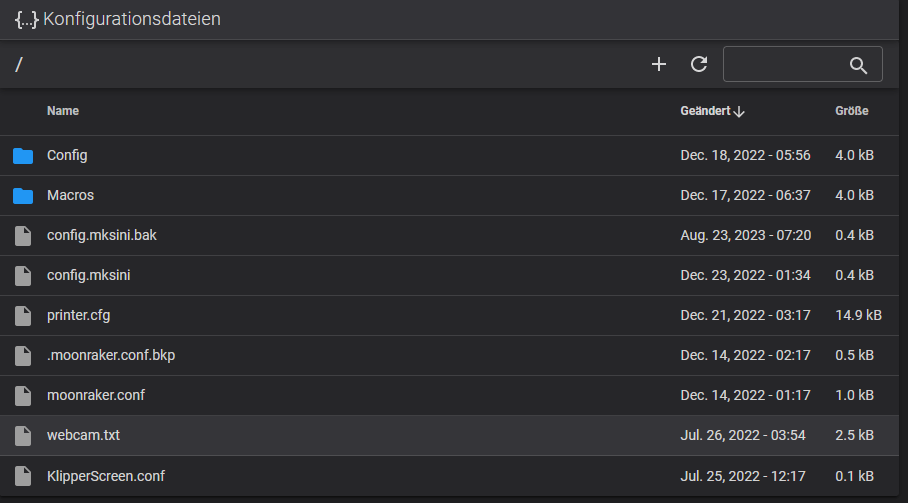
- use all the files proviced in the “Macros” folder and upload them as well:

- and finally the same with the “Config” Folder:

- go to your Backup_printer.cfg and search for your serial number. copy this line and replace the line in the MKS_THR.cfg file. otherwise your mcu will not be found.

- now, restart your Klipper system.
you might notice, that the printer.cfg is well structured and the printer cant move without any home command. this will provide your printer from crashing.
Make sure you do a PID Tuning as well as input shaping and also mesh compensation after you have rebooted your printer to override my personal settings.