
Bed level calibration - using a flatbed scanner
We calculate the final price from your selected file. You review and accept it before payment.
Estimated printing price per file
€0.11 – €0.13 net (excluding VAT)
For file: scanner-bed-level-calibration-spiral_0.15mm_PLA_MK3SMMU2S_8m.gcode
This is an estimate for one file. You’ll confirm the exact price before ordering.
File and estimate settings
File used for this estimate
Average indicative estimate: €0.12 excluding VAT (range midpoint).
- Weight reported by the author
- 1 g
- Print time reported by the author
- 8.4 min
- Source material
- PLA
- Estimate material
- PLA
- Estimate printer
- Bambu Lab P1S - 0.4 nozzle
- Estimate process
- 0.20mm Standard
Indicative estimate for the selected file only, based on the author’s weight and print time. File variants are not added together. The final price is calculated after file analysis.
Saved on this device.

A calibration sheet that can be used in combination with a document scanner to perform precise bed level correction.
- Rating
- 0 / 5
- Likes
- 13
- Downloads
- 202
- Makes
- 1
- Views
- 1,139
- Reviews
- 0
Updated at source:
Model information
- Source
- Printables
- Category
- Test Models
- License
- Creative Commons — Attribution
The standard bed level correction procedure can be very time consuming and tedious. This calibration sheet is designed to be used in combination with a conventional flatbed document scanner. The line widths are analyzed on the scanned image using edge detection and measurement tools in Inkscape. That way precise adjustments can be performed and optimal calibration achieved. The print time is also reduced to 8 min instead of 30 min for the standard calibration file. These improvements speed up the calibration process and make it a lot easier.
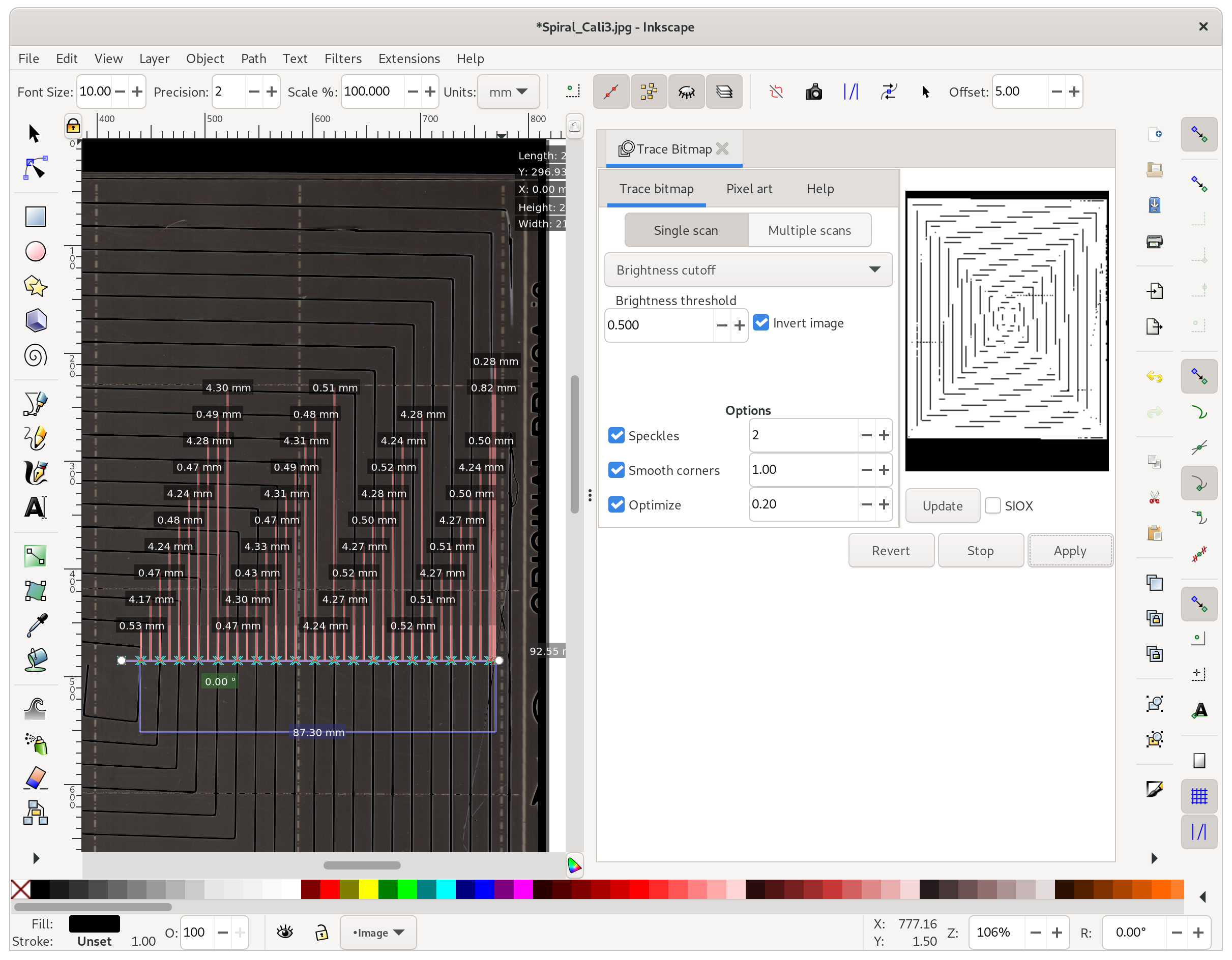
Procedure:
- Preheat the printer for best results.
- Print the
scanner-bed-level-calibration-spiral.3mffile in a white filament to achieve a good contrast to the steel sheet print bed. - Place the steel sheet with the print still attached on a flatbed scanner
- Scan using a high resolution (600dpi) and save as a JPEG file.
- Import the JPEG into Inkscape.
- Click on Path>Trace Bitmap.
- Check
Invert imageand then clickApplyto perform the edge detection. - Use the measurement tool to perform multiple measurements on lines in front, back, left and right.
- Calculate a mean value for each direction. The ideal value should be 0.5 mm
- Adjust the printers level correction parameters for each direction according to the following rule:
mean_value/0.5*200-200 - Repeat at step 1 until you are happy with the result.
I was able to perform calibration within three cycles, while it took me hours with the standard procedure. Good luck and happy printing :)