
SLA Printer Z axis limiter bar offset
We calculate the final price from your selected file. You review and accept it before payment.
Saved on this device.

Small spacer that offsets the bar that trips the Z limiter sensor by 3mm. Fixes homing issue: plate crashing into screen
- Rating
- 0 / 5
- Likes
- 2
- Downloads
- 13
- Makes
- 0
- Views
- 190
- Reviews
- 0
Updated at source:
Model information
- Source
- Printables
- Category
- Anycubic Parts & Upgrades
- License
- Creative Commons — Attribution
After purchasing the KOYOFEI magnetic build plate (see picture) for my Anycubic Mono X 6K printer, I started running into an issue with homing the machine, where the build plate crashes into the screen before the Z limit switch is tripped, resulting in a grinding noise and an inability to zero the Z axis.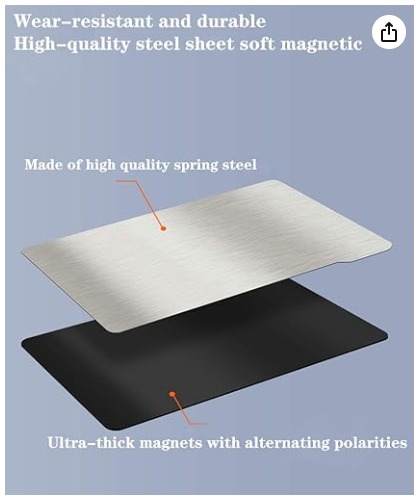
Product Link: https://www.amazon.com/gp/product/B09KXYRGX9/ref=ppx_yo_dt_b_search_asin_title?ie=UTF8&th=1
The issue was that the thickness of the magnetic surface and the new build plate were too thick for the Z limit switch to get tripped.
This is a small printable offset that you can use to compensate for the thickness of the magnetic surface and the new build plate (3mm).
To install it (on the Anycubic Mono X 6K), you will need slightly longer hardware (M3 x 8mm).
1. Print the piece (I used one of my FDM printers/4 min print)
2. Remove the black plate that trips the Z limit switch from the printer
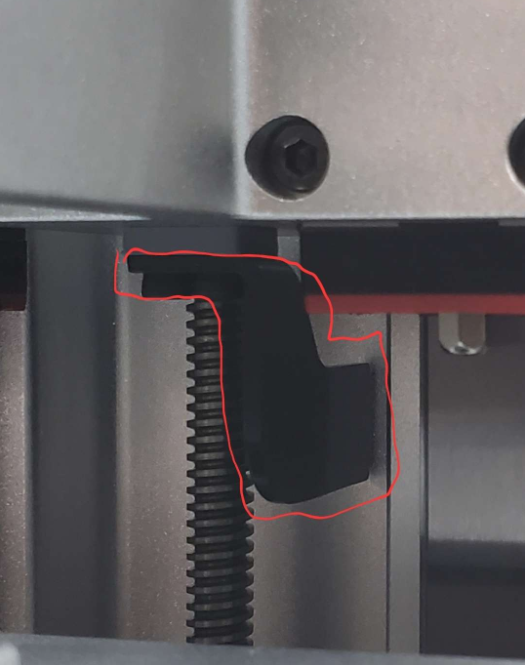
3. Reinstall using M3 x 8mm hardware: thread the new screws through the black plate and the spacer.
Note: the holes are offset to one side, so make sure to orient it correctly (flush with the edge and holes lining up)