
Hot-Swappable 4 x 3.5" HD Rack With 120mm Fan
Obliczymy ostateczną cenę na podstawie wybranego pliku. Sprawdzisz ją i zaakceptujesz przed płatnością.
Zapisane na tym urządzeniu.

An inexpensive hot-swappable rack that holds 4 x 3.5" hard drives cooled by a 120mm fan.
- Ocena
- 0 / 5
- Polubienia
- 35
- Pobrania
- 127
- Wydruki
- 0
- Wyświetlenia
- 1152
- Oceny
- 0
Aktualizacja u źródła:
Informacje o modelu
- Źródło
- Printables
- Kategoria
- Computers
- Licencja
- Creative Commons — Attribution
Overview
This is an inexpensive hot-swappable rack that holds 4 x 3.5" hard drives cooled by a 120mm fan.
4 SATA extension cables connect the HDDs to ports located at the rear of the rack. SATA cables can then be run from the computer to the rear of the HDD Rack. I know that running 4 SATA cables from the computer isn't very tidy, however I opted for this solution for its simplicity and cost effectiveness.
Bill of Materials
Purchased Parts:
- 4x SATA 22 Pin Female to SATA (7+15) Pin Male Data Power Combo Extension Cable
- 1x 120mm Fan
- 1x Prototype circuit board (approximately 6x13 holes needed)
- 4x M3x40 Bolt
- 2x M3x25 Bolt
- 4x M3x16 Bolt
- 6x M3 Nyloc Nut
- 20x Cable Ties, 1.1x2.5mm section, 4" long
Printed Parts:
- 1x Main_Body
- 4x HD_Tray_3.5in
- 1x Vent_Front
- 1x Vent_Rear
- 3x SATA_Support_Top
- 1x SATA_Support_Bottom
- 4x SATA_Support_Clamp
- 1x SATA_Support_Exterior
Assembly
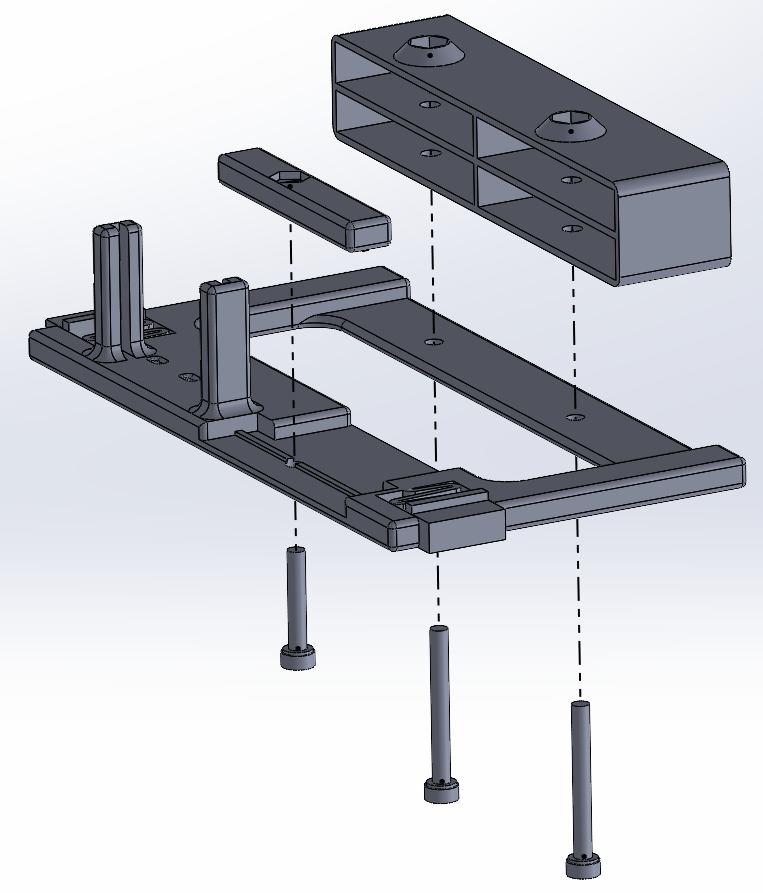
Exploded views, excluding cables and nuts:


Cables
Which Cables to Buy
- This design uses SATA extension cables to support the hot-swap functionality.
- I purchased a 4 pack from Amazon for $20 CAD under the listing: Longdex 4PCS 50cm SATA 22 Pin Female to SATA(7+15) Pin Male Data Power Combo Extension Cable
- The SATA supports are designed for a specific cable end which looks like:

Modifications
- You must drill a hole through the cable ends so that a screw may pass through. To do this, position the cable onto the printed SATA_Support. The grove on the cable end will align it with the SATA_Support. Position the drill bit in the hole on the SATA_Support and drill through to the other side of the cable end.

Cable Management & Wiring
- Cable Management can be tricky and tight. I strongly recommend looking for shorter cables than I used.
- I began by running the power wires to a circuit board on the SATA_Support_Bottom. Here I cut off any excess wire, and soldered the wires together in parallel, which greatly reduced the bulk of wires. This is also where the 120mm fan can be be connect into the 12V supply. I recommend adding a flyback diode so that the fan does not put current back into the system.

- There is a notch on the SATA_Support that the power wires can run neatly through and be tied with a zip-tie
- The data wires can be coiled up and neatly tied down with zip ties on the opposing side

Thermals
Despite the large bulk of wires, running the fan dropped the disk temperature from about 50C to 35C in 25C ambient temperature.