
Parametric Lego Brick
Obliczymy ostateczną cenę na podstawie wybranego pliku. Sprawdzisz ją i zaakceptujesz przed płatnością.
Zapisane na tym urządzeniu.
Informacje o modelu
- Źródło
- Printables
- Kategoria
- Building Toys
- Licencja
- Open Community License v1
Create your own Lego Bricks by setting variables to suit your needs! I wanted to make my own lego bricks of virtually any size and shape. Designed from scratch in OnShape.
Print Settings:
100% infill
No supports, although there is short bridging
No internal brim
You can customize your own Lego Bricks by following the directions in the Parametric Lego Brick.pdf or by opening this OnShape project while logged into an OnShape account (free).
Copy the project to your own profile, then set your desired variables such as #xMultiplier, #yMultiplier, #zMultiplier, #angleMultiplier, and #cornerRadiusMultiplier depending on which type of Lego Brick you are making.
Once you have opened the OnShape document, select Make a copy to edit at the top center of your screen*. When the document has been copied to your OnShape profile, open it and you will see two parts at the bottom of your screen: Rectangle or Angled Brick and Rounded Brick.
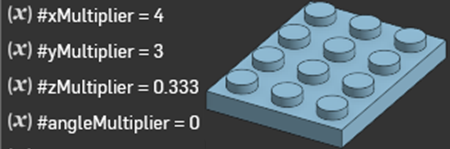
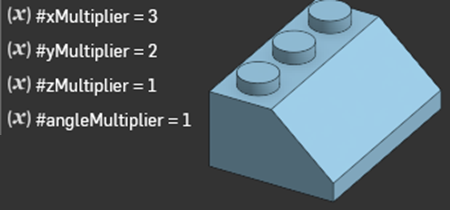
The first part, Rectangle or Angled Brick, can be used to generate platforms and rectangular or bricks 1x1 or larger. Change the #xMultiplier, #yMultiplier, #zMultiplier, and #angleMultiplier variables until you are satisfied with the Lego Brick you’ve created.
The second part, Rounded Brick, can be used to generate rounded platforms, rounded bricks, or round studs. Change the #xMultiplier, #yMultiplier, #zMultiplier, and #cornerRadiusMultiplier variables until you are satisfied with the Lego Brick you’ve created.
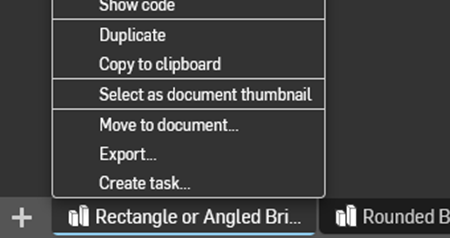
When you are finished, right click the current part tab at the bottom of the screen and select Export.
Tips:
Use the #angleMultiplier variable to specify how many units deep the angle is
Use a #zMultiplier of 1/3 (0.333) to make platforms
If you do not see “Make a copy to edit”, you must create (free) or sign into an OnShape account.
There are additional examples of different brick types and their variables in the Parametric Lego Brick.pdf document.
If you have a well calibrated printer (Prusa, Bambu, etc.) I recommend setting #tolerance to 0mm. If you have an older or cheaper printer like me (Longer, Creality, Anycubic, etc.), I recommend bumping it up to 0.05mm. If you still have problems at 0.05mm or higher, consider printing a calibration cube to help dial in some of your print settings.