
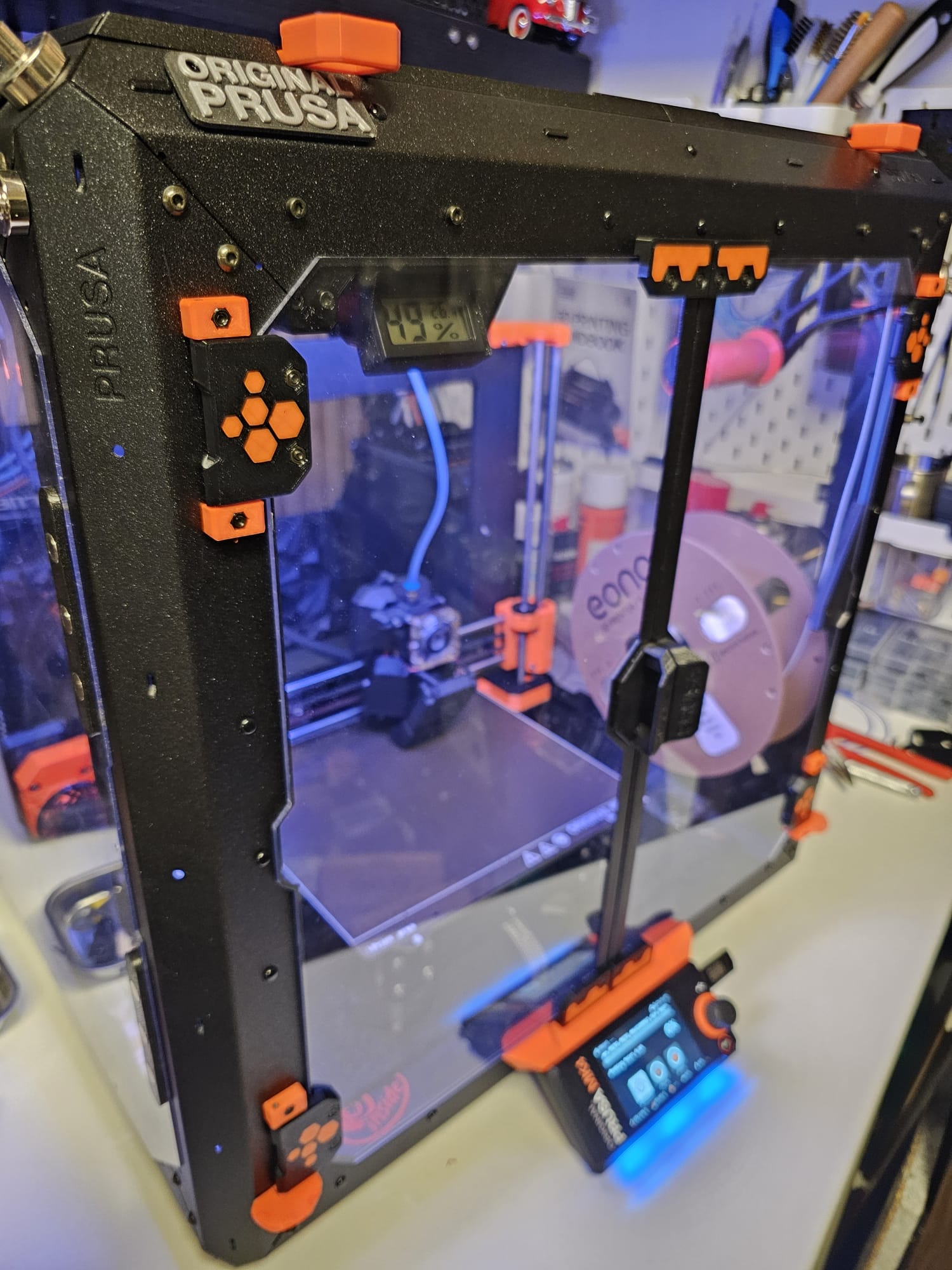
Prusa Enclosure Hexagon Colored parts
We calculate the final price from your selected file. You review and accept it before payment.
Saved on this device.

Prusa enclosure colored door hinges. for printing with MMU, or without MMU with color change in the first layer
- Rating
- 0 / 5
- Likes
- 16
- Downloads
- 33
- Makes
- 0
- Views
- 544
- Reviews
- 0
Updated at source:
Model information
- Source
- Printables
- Category
- Prusa Parts & Upgrades
- License
- GNU General Public License v3.0
Prusa Enclosure Door Hinges and Magnet Parts.
With or without MMU
If you want to print the files with the MMu, use the color tool in the slicer, or use the finished gcode files.
________________________________________________________________________________________________________________
______________________________________________________________________________________________________________________________
In order to use this file without the MMU, you have to change the number to 2 in Prusa slicer under printer/ general/ extruder.
“Check this at Custom G-Code: M600 G1 E0.3 F1500 ; prime after color change "

Now you can insert files 1/2 (Non MMU folder)and choose which part should get which color. When printing starts, color 1 is printed completely, then the printer moves to the pause position and waits for a filament change.
Now the printer will finish printing the rest of the file with the new color.