
CORE One Nozzle Replacement Tool for E3D Nozzles (e.g. ObXidian HF)
We calculate the final price from your selected file. You review and accept it before payment.
Saved on this device.

The original CORE One Nozzle Replacement Tool is incompatible with E3D nozzles - use this tool instead!
- Rating
- 4.957 / 5
- Likes
- 433
- Downloads
- 1,946
- Makes
- 100
- Views
- 7,897
- Reviews
- 94
Updated at source:
Model information
- Source
- Printables
- Category
- Accessories
- License
- GNU General Public License v2.0
tl;dr If you want to switch between E3D nozzles on your CORE One, you should use this tool instead of the original. Because for E3D nozzles the heater block needs to be installed higher, the original nozzle replacement tool is incompatible.
Is my nozzle an E3D nozzle?
E3D nozzles (e.g. ObXidian HF) are slightly different than the Prusa nozzles (e.g. the one shipped with the CORE One):
| Prusa (stock) | E3D (e.g. ObXidian HF) |
| longer shaft | shorter shaft |
| slightly longer thread | slightly shorter thread |
| short nozzle tip below the thread | longer nozzle tip below the thread |
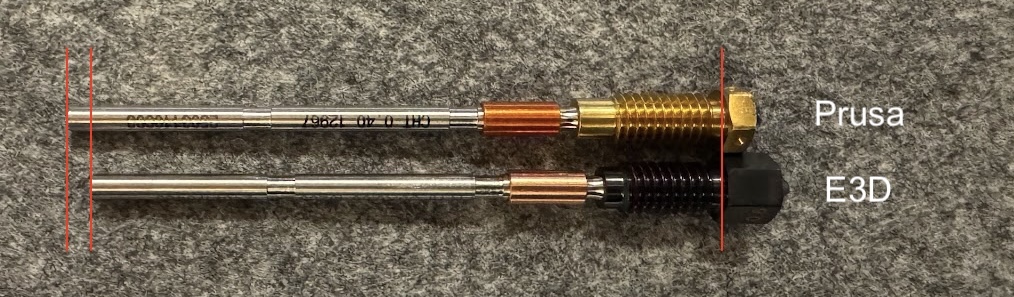
WARNING: This tool will only work with E3D-style nozzles. If you have a Prusa-style nozzle, please use the original nozzle replacement tool.
Why do E3D nozzles need a different tool?
To accomadate the different proportions of the two nozzle types, the heater block needs to be placed higher when installing an E3D nozzle:
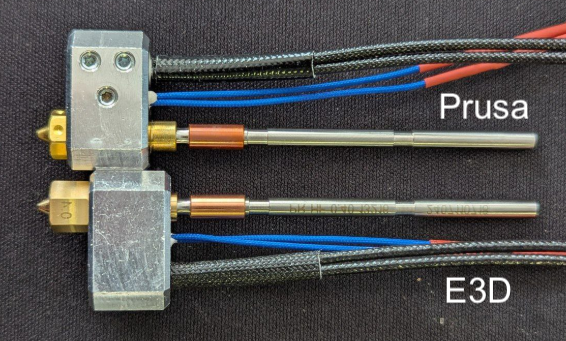
The original tool does not take the height difference into account: I was unable to load filament into the Core One after installing an E3D nozzle with the original tool.
Therefore I have modified the nozzle replacement tool to work flawlassly with E3D nozzles.
Available Variants
- CORE One - E3D Nozzle Replacement Tool - sock: For use with a hotend that has a silicone sock.
- CORE One - E3D Nozzle Replacement Tool - no sock: For use with a hotend without a silicone sock.
Print instructions
- print settings: 0.20mm STRUCTURAL, 2 perimeters, 15% Grid infill
- print material: We suggest PETG (or PC Blend Carbon Fiber for high temperature resistance in case the heater is still a bit warm)
How to guide & installation
For a guide on switching nozzles with the tool, please refer to the guide from the original tool.
IMPORTANT: If you want to switch from a Prusa nozzle to an E3D nozzle, please first use the original tool, because this tool wont fit on the Prusa nozzle. After installing the E3D nozzle with the orignal tool, gently push the heater block up. After tightening both thumb screws, check with this E3D replacement tool, if the heater block has the correct height.