
Freenove 5" Touchscreen Vertical Mount for the Ender 3 S1/Pro
We calculate the final price from your selected file. You review and accept it before payment.
Saved on this device.
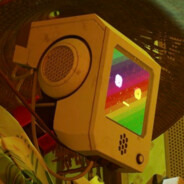
A display case made to fit a Freenove FNK0078 and mount on a Ender 3 S1/Pro
- Rating
- 5 / 5
- Likes
- 32
- Downloads
- 201
- Makes
- 2
- Views
- 2,244
- Reviews
- 1
Updated at source:
Model information
- Source
- Printables
- Category
- Creality Parts & Upgrades
- License
- Creative Commons — Attribution
Bought the cheapest Raspberry Pi 5" display on Amazon and then realized that no other 3D model support this model, so I had to make my own.
The case features a slim design, brightness button and ribbon cable cutouts and a mounting system that works with the stock Ender 3 S1 display bracket.
The fit is tight, but I managed to put the display in place without using too much force. The screen can be secured with four, included M2.5*4 screws. Remember to screw in the included four M2.5*4+4 standoffs on the outer mounting points.
Two pins that allow the case to be mounted on the printer can be printed separately and then glued on in the marked places.
To change the screen orientation you need to change a few settings:
Display orientation:
- Connect to your Raspberry Pi using SSH
- Type: sudo nano /usr/share/X11/xorg.conf.d/90-monitor.conf
- Under: Option “Rotate”, change "normal" to “right”.
- Press Ctrl+X, then Y, then Enter.
Touchscreen orientation:
- Connect to your Raspberry Pi using SSH
- Type: sudo nano /usr/share/X11/xorg.conf.d/40-libinput.conf
- At the end of the touchscreen section, just after “Driver ”libinput"", add: Option "TransformationMatrix" "0 1 0 -1 0 1 0 0 1"
- Press Ctrl+X, then Y, then Enter.
After making those changes, reboot your Pi.
If you have more questions visit: https://klipperscreen.readthedocs.io/en/latest/Hardware/#screen-rotation