Creality K1C Silicone Nozzle Cleaner Mod Easy Bed Plate Swap
We calculate the final price from your selected file. You review and accept it before payment.
Saved on this device.

Holds in place the silicone brush allowing to easly swap plate.
- Rating
- 4.92 / 5
- Likes
- 1,131
- Downloads
- 6,365
- Makes
- 50
- Views
- 31,303
- Reviews
- 50
Updated at source:
Model information
- Source
- Printables
- Category
- Creality Parts & Upgrades
- License
- Creative Commons — Attribution — Noncommercial — Share Alike
NO software modification are required if you have a K1C
Just print, glue up the original silicone brush and screw the bracket in place reusing the 2 carriage screws.
Now you can use whatever plate you want.
I have included a brush mold model so that you can make the brush yourself with some silicone.
IF YOU HAVE K1 / K1 Max:
I found out that on my K1C:
the actual movement algorithm is stored as
"clear_nozzle()" [into prtouch.py] called by
"cmd_NOZZLE_CLEAR()" [into prtouch.py] called by
"cmd_CX_NOZZLE_CLEAR()" [into custom_macro.py].
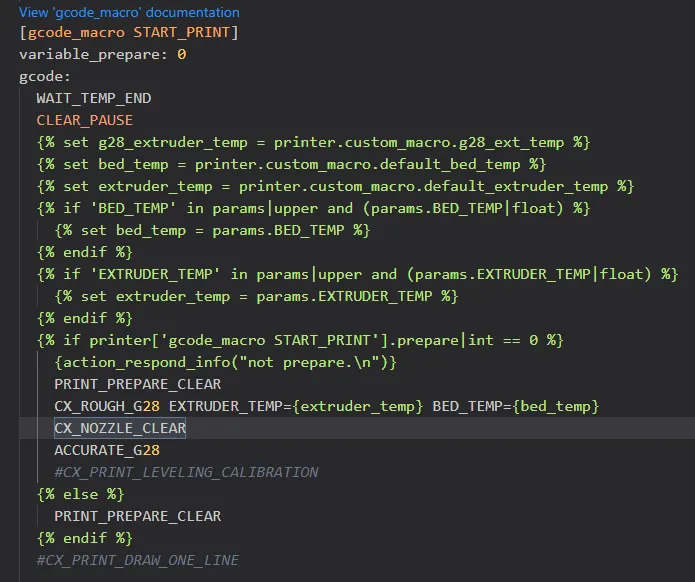
Finally CX_NOZZLE_CLEAR is used into gcode_macro.cfg to achive the goal: it is used in START_PRINT macro as you can see in the picture.
K1 k1c and k1max share the same firmware so I think that if you own a k1 or a k1max and your firmware is updated to the last version you have all what you need to run the CX_NOZZLE_CLEAR routine.
PROBABLY you can do the cleaning by modifying your START_PRINT macro [into gcode_macro.cfg] adding CX_NOZZLE_CLEAR like in the k1c file (picture).
I don't know if it will work.
If you decide to try it let us know.